A Pre-Upload Checklist to Avoid Rejection, Returns, and Lost Sales
In apparel ecommerce, product images are not just visuals — they are decision-makers.
Customers cannot touch the fabric, feel the fit, or try on the clothing. Every buying decision depends on how clearly the product is presented.
That’s why ghost mannequin images have become a standard for apparel brands.
But here’s the problem: Many ecommerce sellers use ghost mannequin images without a proper checklist — and that leads to rejected listings, poor conversions, and high return rates.
This Ghost Mannequin Image Checklist (2026) is designed to help apparel ecommerce sellers, fashion brands, and online retailers check image quality before upload, avoid costly mistakes, and publish images that are platform-safe and conversion-ready.
Who This Ghost Mannequin Checklist Is For
This checklist is created for:
-
Apparel ecommerce store owners
-
Fashion brands selling online
-
Product photographers & studios
-
Ecommerce managers handling large catalogs
If you upload apparel images regularly, this checklist will save time, money, and frustration.
Why You Need a Ghost Mannequin Image Checklist in 2026
In 2026, ecommerce platforms are stricter than ever.
-
Automated image reviews are common
-
Visual accuracy matters more than creativity
-
Poor images directly impact trust and returns
Platforms like Amazon and Shopify prioritize:
-
Clear product representation
-
Accurate garment shape
-
Consistent image quality
Without a checklist, sellers often:
-
Upload images too quickly
-
Miss small technical issues
-
Re-upload the same rejected images
A checklist turns image uploading into a repeatable system, not guesswork.
What Makes a Ghost Mannequin Image “Ecommerce-Ready”
A ghost mannequin image is ecommerce-ready when it:
-
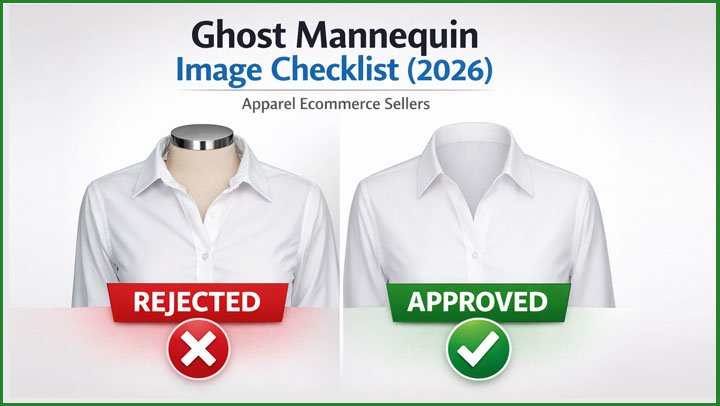
Shows the true shape of the garment
-
Looks natural and realistic
-
Removes all mannequin visibility
-
Maintains accurate color and texture
-
Works well at thumbnail and zoom levels
A beautiful image that misrepresents the product is worse than a simple one.
The 3 Core Areas This Checklist Covers
This guide is structured around three critical areas:
1️⃣ Technical Image Quality
2️⃣ Ghost Mannequin Editing Accuracy
3️⃣ Ecommerce & Platform Compliance
Each section prevents a different category of problems.
Section 1: Technical Image Quality Checklist (Foundation)
Before checking mannequin or styling issues, the technical foundation must be correct.
✅ Image Resolution Checklist
-
☐ Image is high-resolution (not upscaled)
-
☐ Fabric texture remains sharp
-
☐ No pixelation when zoomed
-
☐ No heavy compression artifacts
Low-quality images reduce trust immediately, even if they meet platform rules.
✅ Background Quality Checklist
-
☐ Background is clean and uniform
-
☐ No visible texture or gradient
-
☐ No color cast around edges
-
☐ Shadows do not touch image borders
Background issues are one of the most common reasons images fail review.
✅ Edge & Cut-Out Quality Checklist
-
☐ Clean edges around sleeves and hems
-
☐ No jagged or rough outlines
-
☐ No gray or dark halos
-
☐ Fabric fibers look natural
Auto background removal tools often fail this step.
Section 2: Ghost Mannequin Editing Checklist (Most Important)
This is where most sellers unknowingly make mistakes.
✅ Mannequin Visibility Checklist
-
☐ No visible mannequin parts
-
☐ No neck rings or shoulder edges
-
☐ No shadow revealing mannequin shape
-
☐ No reflection or color hint from mannequin
If the mannequin is even slightly visible, the image is not ecommerce-safe.
✅ Neck Joint & Inner Collar Checklist
-
☐ Neck joint looks natural
-
☐ Inner collar depth looks realistic
-
☐ Stitching lines align correctly
-
☐ Fabric texture matches the garment
A fake-looking neck joint instantly signals “edited” to buyers.
✅ Garment Shape Accuracy Checklist
-
☐ No slimming or reshaping
-
☐ Shoulder width matches real product
-
☐ Sleeve length is accurate
-
☐ Natural folds and wrinkles preserved
Over-editing may look attractive, but it increases returns.
Why Shape Accuracy Matters More Than Style
Many apparel sellers focus on making clothing look “perfect.”
In ecommerce, accuracy converts better than perfection.
When customers receive a product that looks different from the image:
-
Trust drops
-
Returns increase
-
Reviews suffer
Ghost mannequin editing should reveal, not redesign.
Section 3: Ecommerce Conversion Checklist (Often Ignored)
Even technically correct images can fail if they don’t support buying decisions.
✅ Thumbnail & Mobile View Checklist
-
☐ Garment is clear at small size
-
☐ Key details visible without zoom
-
☐ Image doesn’t look flat at thumbnail size
Most buyers see your image first on mobile.
✅ Image Consistency Checklist
-
☐ Same angle across product line
-
☐ Same scale across categories
-
☐ Same lighting style across images
Consistency increases brand trust and perceived professionalism.
Common Mistakes Sellers Make Without a Checklist
Without a ghost mannequin checklist, sellers often:
-
Rush uploads before checking details
-
Rely on auto-editing tools
-
Re-use images across variations
-
Over-edit garments to look “better”
-
Ignore how images appear on mobile
These mistakes compound across catalogs.
Why a Checklist Improves Conversion (Not Just Approval)
A proper ghost mannequin checklist:
-
Reduces buyer confusion
-
Sets correct expectations
-
Lowers return rates
-
Improves brand trust
-
Creates scalable image workflows
Good images don’t just get approved — they sell.
Platform-Specific Ghost Mannequin Checklist (Very Important)
Most sellers make this mistake: They use one image style everywhere and hope it works.
In reality, ecommerce platforms evaluate images differently.
Ghost Mannequin Checklist for Amazon Apparel Listings
On Amazon, images are treated as compliance assets, not marketing visuals.
✅ Amazon Main Image Checklist (Ghost Mannequin)
-
☐ Background is pure white (RGB 255,255,255)
-
☐ Mannequin is 100% invisible
-
☐ Garment fills at least 85% of the frame
-
☐ No text, logos, or graphic elements
-
☐ No visible shadows touching borders
-
☐ Accurate color for selected variation
Amazon’s automated systems flag tiny errors, especially around:
-
Shoulder edges
-
Background purity
If the image looks even slightly “edited,” rejection risk increases.
✅ Amazon Ghost Mannequin Accuracy Checklist
-
☐ Neck joint looks naturally photographed
-
☐ Inner collar depth is realistic
-
☐ No slimming or reshaping
-
☐ Natural folds and wrinkles preserved
-
☐ Fabric texture matches the real product
Amazon prioritizes accuracy over aesthetics.
Ghost Mannequin Checklist for Shopify Apparel Stores
On Shopify, there is more visual freedom, but conversion standards are higher.
✅ Shopify Ghost Mannequin Visual Checklist
-
☐ Background is clean and consistent
-
☐ Lighting style matches brand identity
-
☐ Garment shape looks realistic and premium
-
☐ Neck joint blends naturally
-
☐ Image looks strong on mobile and desktop
Shopify doesn’t reject images like Amazon —
but buyers do.
Poor ghost mannequin images increase:
-
Bounce rate
-
Return rate
-
Customer questions
✅ Shopify Conversion-Focused Checklist
-
☐ Clear silhouette at thumbnail size
-
☐ Fabric texture visible without zoom
-
☐ Consistent angle across products
-
☐ Matches lifestyle or flat-lay images in style
On Shopify, ghost mannequin images must sell the fit, not just pass rules.
One Image, Two Platforms? Here’s the Reality
Many sellers ask: “Can I use the same ghost mannequin image for Amazon and Shopify?”
The honest answer:
-
Sometimes, but not always.
Best practice:
-
Amazon version → stricter, cleaner, compliance-first
-
Shopify version → slightly more depth, brand-aligned
Using two optimized versions often improves:
-
Approval rate
-
Conversion rate
-
Brand perception
Pre-Upload Ghost Mannequin Checklist (60-Second Final Review)
Before uploading any ghost mannequin image anywhere, pause and run this final check.
✅ 60-Second Pre-Upload Checklist
-
☐ Would this image confuse a first-time buyer?
-
☐ Does the garment look exactly like the real product?
-
☐ Is the mannequin truly invisible?
-
☐ Does the image look natural, not edited?
-
☐ Does it look good on mobile?
If you hesitate on any question, don’t upload yet.
Ghost Mannequin Checklist for Bulk Apparel Catalogs
If you manage dozens or hundreds of SKUs, consistency matters more than perfection.
✅ Bulk Catalog Consistency Checklist
-
☐ Same mannequin type used across products
-
☐ Same camera distance and angle
-
☐ Same lighting style
-
☐ Same neck joint depth
-
☐ Same background tone
Inconsistent ghost mannequin images:
-
Look unprofessional
-
Reduce brand trust
-
Increase customer doubt
Consistency scales trust.
Common Platform-Specific Mistakes Sellers Still Make
Even experienced sellers make these errors:
-
Using Amazon-style images on Shopify without brand polish
-
Using Shopify-style images on Amazon (causes rejection)
-
Re-using one image across all color variations
-
Ignoring mobile previews
-
Uploading without a final checklist
These mistakes don’t look big — but they cost sales.
Why This Checklist Works Long-Term
This checklist is not just for 2026.
It helps you:
-
Build a repeatable image workflow
-
Train teams and editors
-
Scale catalogs safely
-
Reduce revisions and rejections
-
Improve conversion over time
Professional brands don’t guess — they standardize.
The Master Ghost Mannequin Image Checklist (2026 Edition)
This is the one checklist apparel sellers should rely on before publishing images anywhere.
✅ Master Technical Checklist
-
☐ High-resolution image (not upscaled)
-
☐ Fabric texture remains sharp when zoomed
-
☐ Clean background with no gradients
-
☐ No compression artifacts
-
☐ No color cast around edges
✅ Master Ghost Mannequin Accuracy Checklist
-
☐ Mannequin completely invisible
-
☐ No neck rings, shoulder edges, or shadows
-
☐ Neck joint looks naturally photographed
-
☐ Inner collar depth is realistic
-
☐ Fabric alignment matches original garment
✅ Master Shape & Fit Checklist
-
☐ No slimming or reshaping
-
☐ Shoulder width matches real product
-
☐ Sleeve length accurate
-
☐ Natural folds preserved
-
☐ No stretched or compressed areas
✅ Master Ecommerce Conversion Checklist
-
☐ Clear silhouette at thumbnail size
-
☐ Looks good on mobile devices
-
☐ Consistent angle across products
-
☐ Matches brand image style
-
☐ Sets accurate customer expectations
If this checklist passes, your image is safe, scalable, and sellable.
Pass vs Fail: How Sellers Can Self-Evaluate Images
Many sellers ask: “How do I know if my ghost mannequin image is good enough?”
Use this comparison mindset.
❌ FAIL Signals
-
Image looks “edited”
-
Neck joint feels flat or fake
-
Garment looks slimmer than reality
-
Edges look rough
-
Buyer might feel misled
✅ PASS Signals
-
Image looks naturally photographed
-
Garment shape feels realistic
-
Fabric depth looks natural
-
No visible editing artifacts
-
Buyer confidence increases
If you wouldn’t trust the image as a buyer, don’t upload it.
Fix vs Re-Edit vs Re-Shoot: How to Decide
This decision saves sellers a lot of money.
✔ Fix the Image When:
-
Background is almost correct
-
Mannequin is barely visible
-
Shape needs minor correction
-
Neck joint needs refinement
✔ Re-Edit When:
-
Ghost mannequin work is poorly done
-
Neck joint looks fake
-
Edges are rough throughout
✔ Re-Shoot When (Rare):
-
Original photo is low quality
-
Garment was photographed incorrectly
-
Fabric texture is unclear
-
Lighting hides product details
Most ecommerce images fall into fix or re-edit, not re-shoot.
Why Most Apparel Sellers Struggle Without a Checklist
Without a checklist, sellers:
-
Upload too fast
-
Miss small errors
-
Depend on guesswork
-
Repeat the same mistakes
-
Waste time on revisions
A checklist removes emotion and speed pressure.
Professional brands rely on systems, not opinions.
How This Checklist Reduces Returns (Not Just Rejections)
Ghost mannequin images influence expectations.
Accurate images:
-
Set correct fit expectations
-
Reduce “not as described” complaints
-
Improve customer satisfaction
-
Protect brand reputation
Returns are often an image problem, not a product problem.
Turning This Checklist Into a Competitive Advantage
Top apparel brands don’t just follow rules — they standardize quality.
They use this checklist to:
-
Train photographers
-
Guide editors
-
Review outsourced work
-
Scale catalogs safely
-
Maintain brand consistency
This is how brands grow without chaos.
When to Outsource Ghost Mannequin Editing
If you:
-
Upload products weekly
-
Manage many SKUs
-
Sell on multiple platforms
-
Want consistent quality
Outsourcing becomes more efficient than in-house fixes.
Professional services follow checklists like this by default.
How Professional Ghost Mannequin Services Use This Checklist
Professional editors:
-
Start with technical checks
-
Validate mannequin invisibility
-
Preserve garment shape
-
Optimize for platform rules
-
Deliver consistency at scale
This reduces:
-
Revisions
-
Rejections
-
Internal workload
And improves:
-
Speed
-
Conversion
-
Brand trust
Final Advice for Apparel Ecommerce Sellers (2026)
Ghost mannequin images are not a design trend.
They are a commerce tool.
In 2026:
-
Accuracy beats creativity
-
Consistency beats experimentation
-
Checklists beat guessing
Sellers who treat images professionally win faster and scale safer.
Need Help Applying This Checklist?
At Clipping Area, we help apparel ecommerce brands:
-
Create compliant ghost mannequin images
-
Fix poorly edited images
-
Maintain consistent quality at scale
-
Improve conversion while reducing returns
If you’re a clothing brand looking for clean, natural ghost mannequin edits at scale, Clipping Area offers professional ghost mannequin photo editing with fast turnaround and consistent quality.
👉 Start with a free ghost mannequin editing trial
Apply this checklist — or let us handle it for you.