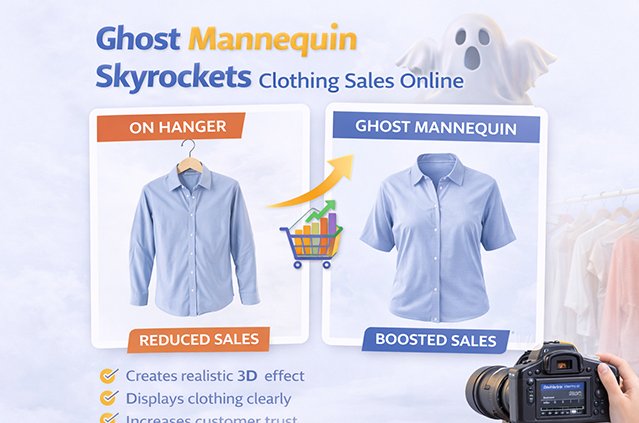
Online shoppers cannot touch a jacket, feel a fabric, or try on a dress before they buy. They rely almost entirely on product photos. That is why ghost mannequin photo editing has become a standard technique for fashion brands, apparel stores, and ecommerce sellers. It shows a garment’s true shape and fit without the distraction of a model or a visible mannequin.
When done well, ghost mannequin images make clothing look clean, three-dimensional, and ready to wear. They help shoppers understand what they are buying. And when shoppers understand a product clearly, they are more likely to buy with confidence.
In this guide, you will learn what ghost mannequin photo editing is, how it works, why it matters for online clothing sales, and how to get consistent, professional results for your store.
What Is Ghost Mannequin Photo Editing?
Ghost mannequin photo editing is a post-production technique that removes the mannequin from clothing photos and blends multiple shots into one image. The result shows the garment with its natural 3D shape, including the inner neckline and back label, as if worn by an invisible person. It is also called the invisible mannequin or hollow man effect.
This style is popular because it gives shoppers a realistic view of how a garment sits on a body, without a model pulling attention away from the product.
How the Ghost Mannequin Effect Works
The ghost mannequin effect is created in two stages: photography and editing. Both matter. A skilled editor can fix a lot, but good source photos make the final result far better.
Step 1: Photographing the garment
The photographer dresses a mannequin in the garment and shoots it from the front. Then they take additional shots, usually:
- The inside back of the garment, often shot with the garment turned inside out or laid flat, to capture the inner neckline and label area.
- The back view, if the store shows rear images.
- Detail shots, such as sleeve openings, cuffs, or the inside of a waistband.
Many photographers use mannequins with removable parts, such as detachable necks, arms, or chest panels. These make it easier to capture clean openings.
Step 2: Editing in post-production
An editor then:
- Removes the mannequin from the main image using precise clipping paths or masks.
- Places the inner neck or back shot into the empty opening so the garment looks hollow and natural.
- Aligns and blends the layers so edges, shadows, and fabric texture match.
- Removes the background, usually replacing it with pure white or a brand-specific color.
- Retouches the garment, cleaning up lint, dust, loose threads, and small wrinkles.
- Corrects color so the garment on screen matches the real product as closely as possible.
- Adds or refines shadows, if the brand’s style calls for them, to keep the product grounded and natural.
The final image looks simple. But it often combines two or more photos and careful manual work.
Why Product Photos Matter So Much in Online Clothing Sales
In a physical store, a shopper can pick up a shirt, check the stitching, and hold it against their body. Online, the product photo does all of that work.
A good clothing photo needs to answer several silent questions a shopper has:
- What shape is this garment?
- How does the neckline sit?
- How long are the sleeves?
- What does the fabric look like up close?
- Is the color accurate?
- Does this look like a quality product?
If the photo does not answer these questions, the shopper has to guess. Guessing creates doubt. Doubt often leads to abandoned carts, or to purchases that end in returns because the product was not what the buyer expected.
Ghost mannequin images are designed to reduce that guesswork.
How Ghost Mannequin Photo Editing Supports Higher Clothing Sales
No editing technique can guarantee sales. Pricing, product quality, reviews, shipping, and marketing all play a role. But clear, professional product images remove one of the biggest barriers in online fashion: uncertainty. Here is how ghost mannequin editing helps.
1. It shows true shape and fit
Flat lay photos show a garment lying on a surface. They are useful, but they often hide how the item looks on a body. Ghost mannequin images keep the garment’s 3D form. Shoppers can see how a blazer’s shoulders hold their structure or how a dress flares from the waist.
This helps buyers picture themselves wearing the item, which is a key step toward purchase.
2. It keeps the focus on the product
A model brings personality, pose, hair, makeup, and styling into a photo. That can be great for lifestyle and campaign images. But on a product page, it can distract from the garment itself.
With the ghost mannequin effect, nothing competes with the clothing. The cut, color, and details take center stage.
3. It creates a consistent catalog
Consistency makes a store look professional and trustworthy. When every product image has the same angle, lighting, background, and framing, shoppers can compare items easily.
Ghost mannequin photos are easy to standardize across hundreds or thousands of SKUs. That uniform look helps category pages feel organized and polished.
4. It builds trust through professional presentation
Shoppers often judge a brand by its visuals before they read a single word. Clean, well-edited images suggest a brand that cares about quality. Messy photos with visible mannequins, uneven backgrounds, or dust spots can make even a great product look cheap.
5. It helps set accurate expectations
When images show the real shape, color, and details of a garment, shoppers know what to expect. Accurate expectations can help reduce returns caused by “it looked different online.” Returns have many causes, including sizing, so product images are only one part of the solution. But they are an important part.
6. It meets marketplace image requirements
Many marketplaces and sales channels have strict image rules. Amazon, for example, requires main product images to use a pure white background, with the product filling most of the frame. Ghost mannequin images on white backgrounds fit these requirements well and can be reused across your website, marketplaces, social ads, and catalogs.
Always check each platform’s current image guidelines, since rules can change.
7. It can be more cost-effective than model shoots at scale
Model shoots involve booking talent, stylists, hair and makeup, and often a studio. For large catalogs with frequent new arrivals, that cost adds up quickly. Mannequin shoots paired with professional editing are usually faster to schedule and easier to repeat. Many brands use both: ghost mannequin images for product pages and model images for campaigns and lifestyle content.
Ghost Mannequin vs. Other Clothing Photography Styles
Each clothing photography style has a purpose. The right choice depends on your brand, budget, and sales channel. Here is a practical comparison.
| Style | What It Shows | Main Strengths | Main Limitations | Best Used For |
|---|---|---|---|---|
| Ghost mannequin | Garment in 3D shape, no visible body | Clear fit and shape, consistent, product-focused, marketplace friendly | Needs skilled editing and extra shots | Product pages, marketplaces, catalogs |
| Flat lay | Garment laid flat on a surface | Simple, fast, low cost | Loses 3D shape, harder to judge fit | Social posts, accessories, kids’ wear, budget catalogs |
| On-model | Garment worn by a real person | Shows movement, styling, scale on a body | Higher cost, less consistent, model can distract | Campaigns, lookbooks, lifestyle pages |
| Visible mannequin | Garment on an unedited mannequin | Quick, shows shape | Mannequin distracts, looks less professional | Internal use, quick listings |
| Hanger shot | Garment on a hanger | Very easy to shoot | Shape often looks limp or distorted | Secondhand listings, quick inventory photos |
Many successful clothing brands combine styles. A common setup is a ghost mannequin image as the main product photo, followed by detail close-ups and one or two on-model images further down the gallery.
Which Garments Benefit Most from Ghost Mannequin Editing?
Ghost mannequin editing works for most clothing that has structure or an opening, such as a neckline, collar, or waistband. It is especially effective for:
- Shirts and blouses, where collars and necklines need to look crisp.
- T-shirts and polo shirts, to show clean necklines and sleeve shape.
- Hoodies and sweatshirts, to reveal the hood shape and inner lining.
- Jackets, blazers, and coats, where structure and tailoring are key selling points.
- Dresses, to show silhouette, waistline, and hem shape.
- Pants, jeans, and shorts, to display the waistband, rise, and leg shape.
- Swimwear and activewear, where fit and cut matter a lot to shoppers.
- Uniforms and workwear, where buyers need to see the exact design.
Soft, unstructured items such as scarves or some knits may look better as flat lays or on a model. The goal is always to show the product as clearly as possible.
Practical Examples of Ghost Mannequin Editing in Action
Here are a few common scenarios that show how brands use this technique.
Example 1: A streetwear hoodie brand
A small streetwear label sells hoodies in eight colors. Originally, they shot every color on a hanger. The hoods looked flat, and shoppers could not see the lining color, which was a key design feature.
By switching to ghost mannequin photos, they could show the hood’s full shape and the contrasting inner lining in every color. All eight colorways now look identical in angle and lighting, so shoppers can compare colors side by side on the category page.
Example 2: A women’s dress boutique
A boutique launches 30 to 50 new dresses each season. Hiring a model for every new arrival is expensive and slow. The boutique now shoots each dress on a mannequin, sends the images for ghost mannequin editing, and uses them as the main product photo. They book a model shoot only for their bestsellers and seasonal campaign.
This gives them fast, consistent product pages while saving model shoots for content that benefits most from it.
Example 3: An outerwear retailer selling on marketplaces
An outerwear retailer lists jackets on its own website and on a large marketplace that requires white backgrounds. Their ghost mannequin images, edited on pure white with accurate color correction, work across both channels. The same image set also feeds their catalog and paid ads, which reduces the need for separate photo versions.
Example 4: A workwear supplier
A company selling branded uniforms needs buyers to see logo placement, pocket position, and collar style clearly. Ghost mannequin images show these details without a model’s arms or pose hiding anything. Buyers ordering in bulk can confirm the design quickly.
How to Shoot Clothing for the Best Ghost Mannequin Results
Great editing starts with good photography. If you shoot your own products, these tips will help your editor deliver cleaner, more natural results.
Use the right mannequin
Choose a mannequin with removable parts, especially a detachable neck and arms. Make sure the mannequin size matches your garments. A mannequin that is too big stretches the fabric. One that is too small makes clothing look baggy.
Keep the camera position fixed
Use a tripod. Do not change the camera height, angle, or zoom between the front shot and the inner shot. Consistent positioning makes alignment far easier and more accurate.
Light evenly
Use soft, even lighting to avoid harsh shadows and hot spots. Keep the lighting the same across all shots of the same garment, and ideally across your whole catalog.
Shoot the inner parts separately
Photograph the inside of the neckline and back label area. For pants, shoot the inside of the waistband. These shots are what make the final image look hollow and three-dimensional.
Prepare the garment
Steam or iron the clothing before shooting. Use clips or pins at the back of the mannequin to shape the fit, since they will not be visible from the front. Remove tags, stickers, and loose threads where possible.
Shoot in high resolution
Higher resolution gives editors more detail to work with. It also allows zoom features on your product pages to show fabric texture clearly.
What Professional Ghost Mannequin Editing Should Include
Not all editing is equal. When reviewing edited images, use this quality checklist.
| Quality Check | What to Look For |
|---|---|
| Clean mannequin removal | No leftover mannequin edges, shadows, or pole marks |
| Natural neck joint | Inner neckline fits the opening smoothly, with matching perspective |
| Smooth edges | No jagged or blurry outlines around the garment |
| Symmetry | Shoulders, sleeves, and hems look balanced |
| Accurate color | On-screen color closely matches the real product |
| Fabric texture | Texture remains visible, not over-smoothed or plastic-looking |
| Clean background | Consistent pure white or brand color with no gray patches |
| Realistic shadows | Shadows, if used, look natural and consistent |
| Consistent framing | Same size, position, and margins across the product range |
If your images pass these checks, they are ready for product pages, marketplaces, and ads.
Common Ghost Mannequin Editing Mistakes to Avoid
Even small errors can make a product look unprofessional. Watch out for these common problems.
- Mismatched neck insert. The inner neck shot does not align with the front, making the collar look twisted or floating.
- Over-retouching. Removing every wrinkle and texture can make fabric look fake. Some natural texture builds trust.
- Inaccurate colors. Oversaturated or shifted colors create disappointment when the product arrives.
- Inconsistent sizing. One shirt fills the frame while another looks tiny. This makes category pages look messy.
- Hard, unnatural edges. Cutouts that are too sharp or too soft look obviously edited.
- Missing inner details. Skipping the inner shot leaves an empty gap where the neckline should be.
A trained editor avoids these issues through careful masking, alignment, and quality control.
In-House Editing vs. Outsourcing to a Retouching Agency
Some brands edit images internally. Others outsource to a specialist. Here is how the two approaches compare.
| Factor | In-House Editing | Outsourcing to a Retouching Agency |
|---|---|---|
| Cost | Salaries, software, and equipment | Pay per image or per project |
| Scalability | Limited by team size | Can handle large and seasonal volumes |
| Turnaround | Depends on internal workload | Often fast, with scheduled delivery |
| Skill level | Varies by hire | Specialized editors trained in apparel work |
| Consistency | Can drift with staff changes | Built around style guides and QC processes |
| Control | Full direct control | Managed through clear briefs and feedback |
For many growing brands, outsourcing makes sense once product volume increases. It lets the internal team focus on design, sourcing, and marketing while specialists handle post-production.
How Clipping Area Helps Clothing Brands
Clipping Area is a Post-Production Photo Retouching Agency that has worked with ecommerce brands, fashion labels, photographers, and marketing agencies since 2014. Ghost mannequin editing is one of our core services, alongside clipping path, background removal, photo retouching, and color correction.
Our editors work manually on each image. We combine front and inner shots, align necklines carefully, keep fabric texture natural, and match colors to your reference samples. We also follow your brand’s style guide, so every product in your catalog shares the same background, framing, and shadow style.
Whether you need a few images for a new product drop or thousands of images for a seasonal catalog, we can build a workflow around your volume and deadlines. If you are unsure whether your photos are suitable for the ghost mannequin effect, you can send a few sample images and we will review them.
FAQ Section
What is the difference between ghost mannequin and invisible mannequin?
There is no real difference. Ghost mannequin, invisible mannequin, and hollow man are different names for the same technique. Each describes removing the mannequin from clothing photos so the garment appears to be worn by an invisible body.
Does ghost mannequin editing increase sales?
It cannot guarantee sales on its own. However, it helps shoppers see a garment’s shape, fit, and details clearly. Clear, trustworthy images reduce uncertainty, which is one of the main barriers to buying clothing online. Pricing, reviews, and product quality also play major roles.
How many photos do I need for one ghost mannequin image?
Usually at least two: a front shot of the garment on the mannequin and a shot of the inner neck or back area. Some garments, like pants or jackets with complex openings, may need additional shots for the best result.
Can I create a ghost mannequin image from a single photo?
In some cases, an editor can fill small gaps using retouching. But the most natural results come from a separate inner shot. Without it, the neckline or waistband area may look less realistic.
What background color is best for ghost mannequin images?
Pure white is the most common choice because it is clean, professional, and accepted by most marketplaces. Some brands use light gray or a signature brand color for their own website. Choose one and use it consistently.
Is ghost mannequin editing suitable for all types of clothing?
It works best for garments with structure or openings, such as shirts, jackets, dresses, hoodies, and pants. Very soft or shapeless items, like some scarves or loose knits, may look better as flat lays or on-model shots.
How long does ghost mannequin editing take?
It depends on the garment’s complexity and the number of images. Simple T-shirts are faster to edit than structured jackets with detailed collars. Professional agencies usually offer set turnaround times for bulk orders.
Should I use ghost mannequin images or model photos?
Many brands use both. Ghost mannequin images work well as main product photos because they are consistent and product-focused. Model photos add context, movement, and styling. Combining them gives shoppers a complete picture.
Conclusion
Online clothing shoppers make decisions based on what they see. Ghost mannequin photo editing gives them a clear, realistic view of a garment’s shape, fit, and details, without distractions. It creates consistent catalogs, meets marketplace requirements, and helps set accurate expectations. While no single technique guarantees sales, better product images remove a major source of hesitation for buyers.
If you want professional, natural-looking ghost mannequin images for your store, Clipping Area can help. Send us a few sample photos and let our team show you what your products can look like with expert post-production retouching.