You finish a shoot for a new line of linen shirts. The photos look clean on your laptop. The colors feel right, the fabric looks crisp, and the background seems white enough. Then you upload them to your Amazon listing, and the main image gets flagged, or the listing drops out of search with an image warning.
This is the moment most sellers start searching for how to fix rejected Amazon apparel images. The good news is that most image problems can be fixed once you know what to look for. The tricky part is that an image can look great to the human eye and still fail a technical check.
This guide explains why Amazon flags clothing images, how to find the real problem, how to fix each issue step by step, and how to check your corrected files before uploading again. You will also get a problem-and-fix table, a Photoshop workflow, a ghost mannequin checklist, and a final upload checklist.
A note on accuracy: Amazon updates its image rules, and requirements can differ by category and marketplace. This guide separates what Amazon’s own guidance states from general editing best practices. Before you upload, confirm the current product image requirements in Seller Central and the style guide for your apparel category.
Why Does Amazon Reject Apparel Images?
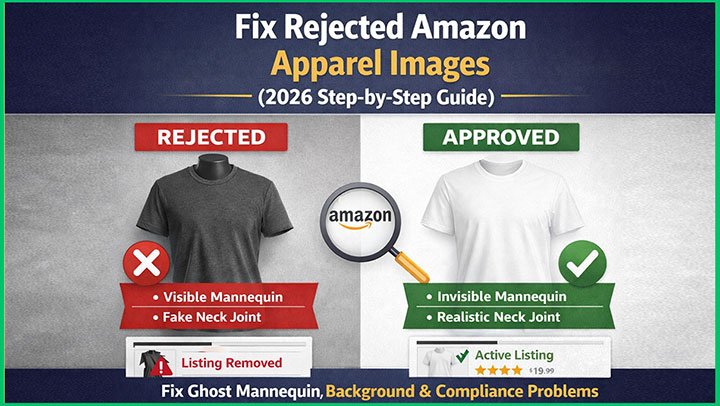
Short answer: Amazon usually rejects or suppresses an apparel image when the main image breaks its image rules or does not clearly show the product being sold. Common causes include a background that is not pure white, a garment that is too small or cut off, added text or watermarks, a visible mannequin or hanger, and low image quality.
It helps to sort problems into two groups, because each group is fixed differently.
Technical image problems are things you can usually fix in editing:
- A background that is off-white, light gray, uneven, or shows a studio floor or wall edge
- A product that is too small in the frame, surrounded by too much whitespace
- A garment that is partly cut off, such as a missing sleeve tip, collar, or hem
- Low resolution, blur, heavy compression, or visible noise
- Poor lighting, underexposure, or harsh contrast
- Colors that do not match the real garment
- Borders, frames, or leftover edges from a bad crop
- Rough cutouts, color halos, or visible mannequin parts
- Over-editing that makes fabric look plastic or fake
Content and listing problems are about what the image shows or claims:
- Promotional text, badges, or graphics on the main image
- Watermarks or logos placed on top of the photo (a logo printed on the garment itself is part of the product, which is different)
- Props or extra items that are not included in the sale
- An image that does not match the color or pattern variation it is attached to
- A presentation style that does not fit the category rules, such as how adult clothing versus kids’ clothing should be shown
- An image that makes the product look different from what the customer will receive
Not every item on these lists triggers an automatic rejection. Some cause a suppressed listing, some get flagged later, and some simply weaken the listing without any warning. Each one is still worth fixing.
Amazon Apparel Image Requirements: What Sellers Should Check
Short answer: Check the main image background, how much of the frame the garment fills, image size, crop, color accuracy, and whether any text, watermark, border, or mannequin is visible. Then confirm the apparel presentation rules for your exact category and marketplace, because adult clothing, kids’ clothing, and accessories are often treated differently.
What Amazon’s guidance states
The points below appear in Amazon’s Seller Central product image guidance and have been repeated by Amazon staff in Seller Central forum replies during 2026. Treat them as your baseline, and confirm them in your own account.
| Area | What Amazon’s guidance says |
|---|---|
| Main image background | Pure white (RGB 255, 255, 255) |
| Product fill on the main image | The product should fill about 85% or more of the frame |
| Minimum size | At least 500 pixels on the longest side |
| Zoom | 1,000 pixels or more on the longest side enables zoom |
| File formats | JPEG preferred; TIFF, PNG, and GIF also accepted |
| Main image content | The actual product only, with no added text, graphics, watermarks, or borders |
Apparel presentation rules vary
This is where outdated blog posts cause real trouble. Amazon’s fashion imaging guidelines have historically asked for adult apparel to be shown on a model, while kids’ and baby clothing, accessories, multipacks, and sets are shown off-model, such as flat or on an invisible mannequin. The same guidance has said that visible mannequins should not appear in product images.
Current third-party guides disagree on the details, especially on whether a ghost mannequin image can be the main image for adult clothing. So do not make that decision from any single article, including this one. Open the current Clothing and Accessories style guide in Seller Central for your marketplace and subcategory, and follow it.
General best practices (not official rules)
- Keep a large master file, for example around 2,000 pixels on the longest side, so zoom has real detail to show.
- Use the same crop, angle, and lighting style across every SKU and color variant.
- Match each variation image to the exact color it represents.
- Keep stitching, fabric texture, buttons, and zippers sharp and visible.
Step-by-Step: How to Fix Rejected Amazon Apparel Images
Step 1: Identify the rejection problem
Do not open Photoshop yet. First, find out what Amazon actually flagged. Check the listing status in Seller Central, look at any listing quality or suppressed listing alerts, and read the image message if one is shown.
Then compare the image against the baseline requirements and write down the specific problem. Guessing wastes time. A common example: a seller thinks a polo shirt image failed because it was too small, re-exports it bigger, and uploads again. It fails again, because the real issue was a background sitting around RGB 245, which looks white on most screens but is not pure white.
Also ask whether the problem is really an image problem. If the image is attached to the wrong variation or the product is in the wrong category, editing will not fix it.
Step 2: Check the main image
The main image (sometimes called the hero image) shows in search results, so it faces the strictest rules. Review it for:
- Background: pure white from edge to edge, with no gray corners or floor line
- Visibility: the full garment is shown and easy to recognize
- Fill: the garment takes up most of the frame
- Position: centered, straight, and not tilted
- Unwanted objects: no hangers, clips, pins, stands, hang tags, or props
- Text and graphics: no badges, sale text, icons, or watermarks
- Presentation: the model, flat, or off-model style matches your category rules
A quick check: in Photoshop, open the Info panel and move the eyedropper over each corner and along the edges. Every background reading should show 255, 255, 255.
Step 3: Fix the background
Most background problems come from a weak cutout or a studio background that was never truly white.
- Separate the garment from the background. A clipping path, drawn with the Pen tool, gives clean hard edges on things like shirt collars and denim seams. Masking works better for soft edges such as knit fuzz, faux fur, frayed hems, and sheer fabric.
- Fill the background with pure white. Put a solid white layer (RGB 255, 255, 255) behind the cut-out garment.
- Do not just brighten the whole image. Pushing exposure until the background turns white will also blow out white and pastel garments and erase their texture.
- Handle shadows carefully. A soft, natural shadow can help a garment look grounded, but a dark or wide gray shadow can make the background read as not pure white. On the main image, keep it very subtle or remove it.
- Protect the edges. Zoom to 200% and check that the cutout does not slice into sleeves, straps, or hood strings.
- Remove halos. A thin gray or colored outline often remains from the old background. Clean it with Select and Mask, color decontamination, or careful manual masking.
White garments on a white background need extra care. Keep a faint natural edge or soft shadow so the garment shape stays visible without adding a colored background.
Step 4: Correct product size and cropping
Amazon’s guidance asks for the product to fill most of the main image frame. Too much whitespace makes a t-shirt look tiny in a search results thumbnail, and shoppers scroll past it.
The opposite mistake is just as common. Cropping too tight can cut off sleeve tips, collar points, hood tops, straps, or hems. A garment that is missing part of its shape does not represent the product fully.
For balanced composition, center the garment, keep similar space on each side, and use one standard canvas size across the catalog. A square canvas is a popular choice, but long items like maxi dresses need a crop plan so the full length still fills the frame well.
Step 5: Improve image quality
Image quality problems are often source problems, and not every one can be fixed in editing.
- Blur: light softness can be improved with careful sharpening. Missed focus or motion blur usually needs a reshoot.
- Noise: reduce it gently. Heavy noise reduction smears fabric texture.
- Low resolution: upscaling adds pixels, not real detail. AI upscalers can even invent texture that does not match the actual weave or knit.
- Compression: saving the same JPEG again and again adds blocky artifacts. Always export from your master file.
- Sharpening: apply it at the end and in moderation. Over-sharpening creates bright outlines and makes knits look crunchy.
- Exposure and contrast: use Levels or Curves to correct brightness while keeping detail in black fabrics and highlights on white fabrics.
Step 6: Correct color problems
Color accuracy matters more in apparel than almost any other category. A navy sweater that shows up looking royal blue leads to disappointed customers and returns.
Common color problems include:
- Wrong white balance: a yellow or blue cast from mixed lighting
- Color shifts: the same product looks different from one angle to the next
- Over-saturation: colors look brighter than the real fabric
- Underexposure: black and dark garments lose detail and turn into flat shapes
To fix them, correct white balance using a neutral reference such as a gray card shot, then compare the image side by side with the physical sample under daylight-balanced light. A calibrated monitor helps a lot. Most sellers export in the sRGB color profile for consistent display on the web.
Step 7: Remove unwanted elements
Clean up anything that is not part of the product: promotional text, watermarks, decorative graphics, borders, safety pins, clamps, stray threads on the background, dust, and visible stands.
Secondary images work differently. Size charts, feature callouts, and detail graphics are common there. Still, follow the rules that apply to your image type and category instead of assuming any design is acceptable. For example, Amazon’s guidance restricts using Amazon logos and badges in seller images.
Step 8: Fix apparel-specific problems
This is where experienced apparel retouching makes the biggest difference. Review:
- Wrinkles and uneven folds from packaging or poor steaming
- Fabric distortion where the garment pulls or bunches unnaturally
- Loose threads and lint
- Neckline and collar shape, including uneven collar points
- Sleeves that twist, hang at different lengths, or hide cuffs
- Buttons and zippers that are crooked, half open, or catching glare
- Logos, labels, and patterns that should stay sharp and aligned
There is a clear line between retouching and misrepresenting. Removing a packaging crease or a stray thread is cleanup. Changing the fit, slimming the silhouette, altering the pattern, or removing a real design feature changes the product. A simple test: if the customer opens the package and the garment looks different from the photo, the edit went too far.
Step 9: Check ghost mannequin images
Ghost mannequin (also called invisible mannequin) images need their own review. Check for:
- A clean neck joint with no gaps or mismatched fabric
- A natural garment shape, not stiff or balloon-like
- Accurate proportions between body, sleeves, and length
- Correct sleeve structure that follows how the garment really hangs
- Proper inner visibility, such as the back neck label area where appropriate
- Clean edges around shoulders and underarms
- Natural fabric shape without warped seams
- No visible mannequin parts, poles, or stands
Step 10: Perform a final compliance check
Before uploading, run the same short process on every file:
- View the image at 100% and check edges, texture, and details.
- View it as a small thumbnail to see how it reads in search.
- Sample the background corners and edges for pure white.
- Compare color against the real garment.
- Confirm the file size, dimensions, and format.
- Confirm the file name matches the right SKU and variation.
- If possible, have a second person review it with fresh eyes.
Common Amazon Apparel Image Problems and Their Fixes
| Image problem | Possible cause | Recommended fix |
|---|---|---|
| Background not pure white | Gray studio sweep or weak cutout | Remove background and fill with RGB 255, 255, 255 |
| Product too small | Too much whitespace | Re-crop so the garment fills most of the frame |
| Garment cut off | Tight or careless crop | Reframe, or extend the canvas if the source allows |
| Blurry image | Missed focus or motion | Use a sharper source image or reshoot |
| Blocky, pixelated detail | Repeated JPEG saves | Re-export once from the original master |
| Color looks wrong | White balance or exposure issue | Correct against the physical sample |
| Visible mannequin | Incomplete ghost mannequin edit | Rebuild the neck joint and remove mannequin areas |
| Rough or gray edges | Weak clipping or masking | Refine edges and remove halos |
| Promotional text on main image | Marketing overlay | Remove it from the main image |
| Watermark | Branding overlay | Remove it and keep branding for approved placements |
| Fabric looks fake | Excessive smoothing | Reduce retouching and restore texture |
| Hanger or clips visible | Shot on hanger or pinned | Remove objects and rebuild hidden fabric areas |
Amazon Main Image vs Secondary Apparel Images
The main image has one job: show the product clearly in search results, in line with Amazon’s strictest rules. For most clothing, that is a clean front view.
Secondary images explain the product in more depth. A typical apparel set may include:
- Back view to show the rear design, pockets, or closures
- Side view to show fit and silhouette
- Detail close-up of fabric, stitching, prints, or hardware
- Lifestyle image showing the garment in a real setting
- Size or fit image with a size chart or measurements
Image strategy depends on your product category and the current Amazon rules. What works for a men’s jacket may not be allowed for a baby romper, so check your category style guide before planning secondary images.
How to Fix Amazon Clothing Images in Photoshop
Here is a practical workflow that a non-designer can follow.
- Open and inspect the source. Zoom in and note blur, color casts, and cut-off areas before editing.
- Create a backup. Duplicate the layer or save a copy so the original stays untouched.
- Remove the background. Use the Pen tool for hard edges, or Select Subject plus a layer mask for complex shapes.
- Refine edges. Use Select and Mask to clean hair, fuzz, and soft fabric edges.
- Correct exposure. Use a Levels or Curves adjustment layer.
- Correct color. Neutralize casts with a Curves or Color Balance adjustment, then compare to the sample.
- Remove distractions. Use the Spot Healing Brush, Clone Stamp, or Remove tool for pins, dust, and threads.
- Retouch garment details. Straighten collars, clean buttons, and align zipper pulls.
- Correct wrinkles carefully. Soften packaging creases but keep natural folds that show how the fabric drapes.
- Improve composition. Center the garment on a white canvas and set a consistent fill.
- Check image quality. View at 100% and as a thumbnail.
- Export correctly. Export a high-quality JPEG in sRGB at your standard size.
- Perform final quality control. Run the Step 10 checklist before upload.
Ghost Mannequin Images for Amazon Apparel
Short answer: Ghost mannequin editing removes the mannequin from a clothing photo so the garment looks worn by an invisible body. It gives a clean, 3D shape without a model. Whether it can be used as the Amazon main image depends on your category and marketplace, so confirm the current style guide.
Apparel brands use this technique because it shows fit and shape more clearly than a flat lay, costs less than a model shoot, and keeps a large catalog consistent.
The neck joint is usually created by shooting the garment twice: once on the mannequin, and once inside out or with the back neck area visible. The editor then combines the two images so the inner back of the neck shows through the opening. Garment shape matters because a slightly off neckline or bent shoulder instantly looks wrong to shoppers.
Common mistakes include flat or stretched neck areas, mismatched fabric color inside the neck, sleeves that look stiff like tubes, leftover mannequin edges near the armholes, and over-smoothing that removes fabric texture. Poor editing makes a garment look like a cardboard cutout.
Ghost mannequin QC checklist
☐ Neck joint is clean and aligned
☐ Inner fabric color matches the outside
☐ Shoulders are even
☐ Sleeves hang naturally
☐ Proportions match the real garment
☐ No mannequin parts, poles, or stands visible
☐ Edges are clean with no halos
☐ Fabric texture is preserved
Before Uploading: Amazon Apparel Image Quality Checklist
☐ Product clearly visible
☐ Main image background checked for pure white
☐ Garment fully visible
☐ Garment fills most of the frame
☐ No accidental cutoffs
☐ Presentation style matches category rules
☐ Color checked against the real sample
☐ Fabric details preserved
☐ No unwanted text on the main image
☐ No watermark
☐ No borders
☐ No rough edges or halos
☐ No visible mannequin, hanger, or clips
☐ Image size meets requirements (1,000 px or more on the longest side for zoom)
☐ Product proportions look natural
☐ Final image reviewed at full size
☐ File exported correctly and named to the right SKU
Why Amazon Images Can Look Fine but Still Cause Problems
“This image looks good” and “this image is prepared correctly for Amazon” are two different statements.
An image can look clean to you and still fail because of:
- Technical compliance: a background at RGB 248 looks white but is not pure white.
- Presentation rules: the garment is too small in the frame, or shown in a style your category does not allow.
- Product representation: the color or shape does not match the real item.
- Category expectations: apparel has extra rules that general product guides skip.
- Main image rules: something acceptable in a secondary image can be a problem in the main slot.
- Image processing: compression or color profile changes during export can shift what Amazon displays.
- Source quality: no amount of editing turns a blurry, low-resolution photo into a sharp one.
Your screen shows how an image looks. A proper check shows whether it is ready.
DIY Editing vs Professional Amazon Apparel Image Editing
| DIY editing | Professional editing | |
|---|---|---|
| Best for | Small batches | Larger volumes |
| Control | Full control | Shared through clear briefs |
| Direct cost | Lower | Per-image or per-project cost |
| Skills needed | Photoshop skills required | Handled by the editing team |
| Time | Takes your internal time | Frees your team for other work |
| Consistency | Can vary by editor and day | Standardized workflow and QC |
| Complex work | Hard for masking and ghost mannequin | Suited to complex apparel retouching |
DIY works well when you have a few SKUs and someone who knows Photoshop. Professional editing makes sense when volume, complexity, or consistency becomes the problem. Either way, editing does not guarantee approval. Amazon reviews listings against its own rules, and some problems sit at the listing level.
When Should You Outsource Amazon Apparel Image Editing?
Outsourcing tends to make sense when:
- You manage a large apparel catalog with many SKUs and color variants
- You update images often for new seasons or drops
- You need complex ghost mannequin work
- Background removal on hundreds of files is slowing your team
- You need bulk image editing on a tight launch date
- Your internal team is small or busy
- You want one consistent editing standard across the catalog
If you only fix a handful of images a month, learning the workflow above may be the better choice.
How Clipping Area Can Help With Amazon Apparel Images
Clipping Area is a post-production photo retouching agency that works on ecommerce and apparel images. For Amazon sellers and clothing brands, the team handles:
- Amazon apparel image editing and clothing photo editing
- Background removal and clipping path
- Ghost mannequin editing
- Product photo retouching and color correction
- Image cleanup for pins, dust, threads, and wrinkles
- Bulk apparel image editing
- Ecommerce product image editing for other marketplaces and online stores
A structured editing and QC workflow helps you prepare cleaner, more consistent product images for review and upload. Final listing decisions still rest with Amazon, so you should always confirm the current rules for your category.
Have a batch of apparel images that needs correction? Send Clipping Area a small sample with your requirements, and the team can review the editing scope and recommend the appropriate workflow.
How to Prevent Future Amazon Apparel Image Rejections
- Create an image checklist and use it on every SKU.
- Use consistent photography with the same lighting, angles, and setup.
- Keep original high-quality files so you can re-edit without quality loss.
- Keep product colors accurate by checking against real samples.
- Use standardized cropping with a template canvas.
- Write editing guidelines that any editor or agency can follow.
- Review main images separately, since they carry the strictest rules.
- Run a final QC step before any upload.
- Keep Amazon requirements under review and recheck your category style guide regularly.
- Check every SKU before bulk upload, not just a sample.
- Use consistent file naming, for example SKU plus image position, to avoid mismatched variations.
Frequently Asked Questions
Why did Amazon reject my apparel image?
The most common reasons are a background that is not pure white, a garment that is too small or cut off, added text or watermarks, a visible mannequin or hanger, low image quality, or a presentation style that does not match your category rules.
How do I fix a rejected Amazon product image?
First identify the exact problem from Seller Central. Then fix that specific issue, such as the background, crop, or quality, run a final check, and upload the corrected file.
What causes Amazon clothing images to be rejected?
Besides general image rules, clothing has category-specific rules about how garments are shown, such as on a model, flat, or off-model. Mismatched color variants and visible mannequins are also common problems.
Can Photoshop fix an Amazon image rejection?
Photoshop can fix most technical problems, including backgrounds, cropping, color, and cleanup. It cannot fix a badly blurred source photo or a listing-level issue such as a wrong category.
How do I fix the background of an Amazon apparel image?
Cut out the garment with a clipping path or mask, place it on a pure white background (RGB 255, 255, 255), clean the edges, and check the corners with the eyedropper.
Why is my Amazon main image not accepted?
The main image has the strictest rules. Check for off-white backgrounds, low product fill, text, badges, borders, props, and whether the presentation style fits your category.
Can ghost mannequin images be used for Amazon apparel?
Ghost mannequin images are widely used on Amazon, especially for secondary images and off-model categories. Whether they are accepted as the main image depends on your category and marketplace, so check the current style guide.
How can I improve Amazon clothing image quality?
Start with a sharp, well-lit source photo at a large size. Then correct exposure and color, sharpen lightly, and export once from the master file.
Should I remove text from Amazon product images?
Remove text from the main image. Secondary images often include size charts or feature callouts, but they should still follow Amazon’s rules for your category.
Can a professional image editor fix rejected Amazon images?
A skilled editor can fix most technical and apparel-specific problems. No editor can guarantee approval, because Amazon applies its own review and some issues are not image related.
How do I prevent future Amazon image rejections?
Use a written checklist, consistent photography, standard cropping, accurate color checks, and a final QC step before every upload.
What should I check before uploading apparel images to Amazon?
Check the background, fill, crop, color, image size, file format, variation match, and any text, watermark, mannequin, or rough edges. Use the checklist above.