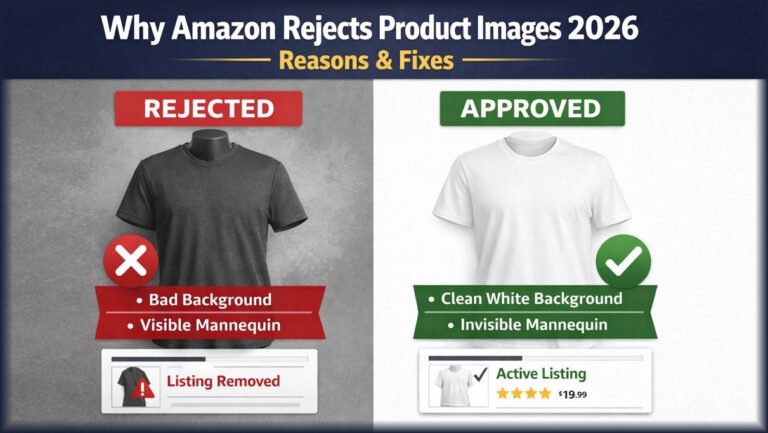
You uploaded your product photos, and Amazon flagged one of them. Or your listing is live, but the main image is suppressed. It is frustrating, especially when the photo looks fine to you.
The good news is that most Amazon image rejection reasons are easy to identify once you know what to look for. Common causes include a background that is not pure white, a product that looks too small, text or badges on the main image, low resolution, visible mannequins, or color that does not match the real product. Some problems come from Amazon’s stated rules. Others come from poor image quality or careless editing.
This guide explains each problem, shows you how to fix it, and helps you prepare images that are ready to upload.
Why Does Amazon Reject Product Images?
Amazon rejects product images when they do not meet its image requirements for the listing, the image type, or the product category. These requirements exist so customers see images that are:
- Accurate to the real product
- Clear and easy to see
- High quality
- Appropriate for the product
- Suitable for a public marketplace
- Consistent with the listing
A rejection does not always mean something is wrong with your product. Often, the problem is only the image file or how the product is presented. A gray background, a cropped strap, or a “Sale” badge can be enough to trigger a problem.
Important: Amazon’s requirements can change and can differ by marketplace, category, and image slot. Always confirm the current rules in Seller Central (the Product Image Requirements page and your category style guide) before you edit or upload.
Amazon Image Rejection Reasons Sellers Should Know in 2026
Below are 20 common problems. We’ve marked each one so you know where it comes from:
- (Amazon rule) = part of Amazon’s published image requirements, usually for the main image
- (Quality issue) = a common image problem that can cause rejection or suppression
- (Varies) = depends on image type, category, or marketplace
- Background is not pure white on the main image (Amazon rule, main image)
- Main image contains text, logos, borders, or badges (Amazon rule, main image)
- Product is too small in the frame (Amazon rule, main image)
- Product is cut off by the frame (Amazon rule, main image)
- Image resolution is too low (Varies)
- Image is blurry or pixelated (Quality issue)
- Product is hard to see clearly (Quality issue)
- Product is shown incorrectly (Amazon rule)
- Promotional text or graphics are present (Varies)
- Watermarks are used (Amazon rule, main image)
- Unrelated props are included (Amazon rule, main image)
- Visible mannequin parts appear (Varies, often apparel)
- Editing is excessive or misleading (Quality issue)
- Product color is inaccurate (Quality issue)
- Product details were altered (Quality issue)
- Composition is poor or cluttered (Quality issue)
- File format or technical specs are wrong (Amazon rule)
- Image does not match the actual product (Amazon rule)
- Duplicate or inappropriate images are uploaded (Varies)
- Category-specific rules are not followed (Varies)
Let’s look at the most important ones in detail.
Amazon Main Image vs Secondary Image Requirements
The main image has the strictest rules. Secondary images usually have more freedom.
Main Image
At the time of writing, Amazon’s general guidance says the main image should:
- Show the actual product, not a drawing or illustration (for most categories)
- Use a pure white background (RGB 255, 255, 255)
- Fill about 85% or more of the image frame
- Show the entire product, not cut off
- Contain no text, logos, borders, color blocks, watermarks, or graphics added on top
- Include only what the customer receives, with no confusing extra items
- Be sharp, well lit, and professional
Secondary Images
Additional images can usually give shoppers more context, such as:
- Close-up product details
- Different angles
- Lifestyle images showing the product in use
- Feature callouts and infographics, where permitted
- Size charts or usage information, where relevant
Secondary images still must be accurate and appropriate. Rules vary by category, so check your category style guide.
1. Amazon Rejects Images Because of Background Problems
Background issues are one of the most common reasons a main image fails. Amazon’s main image guidance calls for pure white, and “almost white” is often not enough.
Common background problems:
- Gray or off-white background: Studio sweeps often photograph as light gray (for example, RGB 245 instead of 255).
- Colored background: Fine for some secondary images, not for most main images.
- Uneven background: Patchy white with darker corners.
- Visible studio edges: Seamless paper edges, light stands, or table lines.
- Heavy background shadows: Dark shadows can make the background look dirty.
- Halo around the product: A thin light or dark outline left by poor cutouts.
- Rough edges: Jagged or blurry edges from automatic background removal.
How to fix it: Use a proper clipping path or image mask to separate the product, then place it on true white. Check the background values with a color picker in Photoshop. A soft, natural shadow under the product often looks better than a floating cutout, but keep it subtle. [Internal link: Background Removal Services] [Internal link: Clipping Path Services]
Remember, not every Amazon image needs a white background. Lifestyle and secondary images can use real settings.
2. Product Is Too Small or Has Too Much Empty Space
Amazon’s main image guidance asks that the product fill roughly 85% of the frame. A small product floating in a large white canvas looks weak in search results and may be flagged.
Watch for:
- Scale: The product should be the clear focus.
- Canvas size: A huge canvas with a small product wastes space.
- White space: Keep margins even and tight.
- Product prominence: Shoppers should recognize the item at thumbnail size.
How to fix it: Crop the canvas closer to the product while keeping even margins. Shoot at higher resolution so you can crop without losing quality.
3. Product Is Cropped Incorrectly
Amazon’s main image rules generally require the whole product to be visible. Cutting off part of it can confuse buyers.
Common mistakes:
- A missing sleeve on a shirt
- One shoe cut off in a pair
- A bag strap running off the edge
- Necklace chains or earring hooks trimmed
- Furniture legs or corners removed
- Dress hems cropped at the bottom
How to fix it: Reshoot with enough space around the product, or extend the canvas if the original photo includes the full item. Never “rebuild” a missing part in a way that changes what the product looks like.
4. Image Resolution Is Too Low
Low resolution makes products look cheap and can block zoom. Amazon’s general guidance recommends images at least 1,000 pixels on the longest side to enable zoom, with a lower absolute minimum. Check the current number in Seller Central.
Problems include:
- Pixelation: Visible squares when zoomed.
- Blur: Missed focus or camera shake.
- Heavy compression: Blocky artifacts from saving at low JPEG quality.
- Upscaling: Enlarging a small image adds size, not detail.
How to fix it: Start with sharp, high-resolution original photos. Export at high quality. Avoid screenshots or images copied from websites.
5. Product Does Not Match the Actual Item
Amazon requires images to accurately represent the product being sold. If the photo and the delivered item differ, you risk returns, bad reviews, and listing problems.
Examples of misrepresentation:
- Changing the product color
- Removing features like pockets, seams, or buttons
- Adding features the product does not have
- Changing the shape or fit
- Altering texture so fabric looks smoother or shinier
- Hiding real design elements
Cleaning vs misrepresenting: Removing dust, lint, a loose thread, or a sensor spot is cleanup. Removing a visible stitch pattern that is part of the design is misrepresentation. Good editing keeps the product honest.
6. Text, Graphics, or Promotional Elements Cause Problems
Amazon’s main image guidance does not allow added text or graphics. This includes:
- “Sale” or discount badges
- Promotional banners
- “Best Seller” graphics
- “Free Shipping” text
- Marketing slogans
- Phone numbers, contact details, or website URLs
Secondary images may allow infographics or feature callouts in many categories. Even there, avoid claims that imitate Amazon badges or promote off-Amazon contact. Rules differ by image type and category.
7. Watermarks and Logos
Not every logo is a problem. The difference is whether the branding is part of the product or added on top.
- Product branding: A logo printed on the product or its packaging is part of the item. This is generally fine.
- Watermarks: Added over the photo. Not allowed on the main image.
- Seller or store logos: Placed in a corner as an overlay. Not allowed on the main image.
- Promotional graphics: Covered in the section above.
How to fix it: Remove overlays and export a clean version. Keep your watermarked images for other uses only.
8. Props and Accessories Create Problems
The main image should show what the customer actually receives. Amazon’s guidance says the main image should not include accessories or props that could confuse buyers.
Avoid:
- Unrelated objects
- Decorative items like plants or books
- Extra accessories not included in the purchase
- Items that suggest a bundle when it is a single product
Props are often fine in lifestyle secondary images, as long as it is clear what is included.
9. Visible Mannequin Parts and Ghost Mannequin Problems
Amazon’s apparel guidance generally does not allow visible mannequins, hangers, or display supports in the main image. Many apparel sellers use ghost mannequin (invisible mannequin) editing to show a garment’s shape without the mannequin. Whether this style suits your listing depends on the current category style guide, so check it first.
Common problems:
- Visible mannequin neck or shoulders
- Plastic edges inside collars or armholes
- Mannequin hands at the sleeve ends
- Stands, poles, or bases showing below the hem
- Hangers, clips, pins, or hooks
- Poor neck joint reconstruction (the inside back of the collar looks empty or wrong)
- Unrealistic garment shapes, like overly stiff or lopsided bodies
Ghost mannequin editing vs a visible mannequin: A visible mannequin shows the display form in the final image. Ghost mannequin editing removes the form and combines a second photo of the inner neck and label area, so the garment looks worn but empty.
Done well, professional ghost mannequin editing removes distractions while keeping the real cut, fabric, seams, and proportions. Done poorly, it creates hollow collars, warped shapes, or visible leftovers. [Internal link: Ghost Mannequin Photo Editing Services]
10. Excessive Photo Editing
Over-editing can make a product look different from what arrives at the customer’s door.
Examples:
- Smoothing fabric until texture disappears
- Reshaping a garment to look slimmer or fuller
- Removing real stitching, pleats, or seams
- Shifting colors for “pop”
- Adding fake or dramatic shadows
- Artificial textures or glows
- Heavy sharpening that creates halos
Good retouching removes distractions, like dust and loose threads, while keeping the product true. If a buyer would say “that’s not what I ordered,” the edit went too far.
11. Incorrect Product Color
Accurate color reduces returns and builds trust. Color errors usually come from:
- White balance: Warm or cool lighting shifts color.
- Lighting: Mixed light sources create color casts.
- Camera settings: Auto settings can change between shots.
- Monitor differences: An uncalibrated screen shows false colors.
- Photoshop adjustments: Aggressive saturation or hue changes.
Correcting vs changing: Color correction removes a lighting cast so the product matches reality. Changing color means showing a shade the product doesn’t have. Compare the edited image to the physical product in neutral daylight. [Internal link: Product Photo Retouching]
12. Technical File Problems
Some rejections are purely technical. Based on Amazon’s general guidance at the time of writing:
- File format: JPEG is preferred. TIFF, PNG, and non-animated GIF are commonly accepted.
- Dimensions: Meet the minimum size, and aim for 1,000+ pixels on the longest side for zoom.
- Color mode: sRGB is the safest choice for web display.
- Compression: Too much compression lowers quality.
- File naming: Amazon uses specific naming conventions for bulk uploads (product identifier plus a variant code).
- Upload errors: Corrupted files or unusual settings can fail.
These details change, so verify the current specs in Seller Central for your marketplace.
13. Category-Specific Image Rules
Amazon can apply extra image rules to certain categories. Categories where expectations often differ include:
- Apparel
- Shoes
- Jewelry
- Beauty
- Home
- Electronics
- Automotive
- Food and grocery
For example, apparel style guides may specify how garments are shown (on a model or laid flat), and rules for kids’ and adult clothing can differ. Don’t rely on general advice alone. Download or review the style guide for your specific category.
Why Amazon Apparel Images Get Rejected
Clothing images face more problems than most categories because fabric is soft, reflective, and hard to present cleanly.
Common apparel issues:
- Ghost mannequin images: Leftover mannequin parts or empty collars.
- Model photos: Poses that hide the garment, or styling that adds items not included.
- Flat lays: Wrinkled, uneven, or poorly shaped garments.
- White backgrounds: Light fabrics blending into the background.
- Cropping: Sleeves, hems, or straps cut off.
- Collars and sleeves: Twisted or asymmetrical.
- Wrinkles: Distracting creases from shipping or storage.
- Color accuracy: Dark fabrics losing detail, bright fabrics clipping.
- Product shape: Garments looking tighter or looser than they fit.
Apparel images need careful post-production to stay clean while keeping true fit and color. [Internal link: Apparel Photo Editing]
Why Amazon Jewelry Images Can Have Image Problems
Jewelry is small and reflective, so small mistakes show up quickly. Watch for:
- Clarity: Fine details like prongs and chain links must be sharp.
- Background: Reflective metal often picks up gray tones.
- Reflections: The camera, photographer, or studio can appear in shiny surfaces.
- Shadows: Harsh shadows hide details.
- Detail visibility: Stones and engravings need clear focus.
- Color: Gold, rose gold, and silver shift easily.
- Accuracy: Over-retouched stones can look fake or larger.
Check Amazon’s jewelry category guidance for any specific requirements.
Why Amazon Product Images Get Rejected Even After Editing
Editing and Amazon compliance are related, but they are not the same thing. An image can be well edited and still fail. Reasons include:
- Wrong source image: Editing can’t fix a blurry or cropped original.
- Incorrect editing: The brief did not match Amazon’s rules.
- Wrong image type: A lifestyle image was uploaded as the main image.
- Category rules: The category has extra requirements.
- Listing-level issues: The problem is with the listing, not the photo.
- Technical problems: File size, format, or naming errors.
- Policy changes: Amazon updated its rules.
How to Fix an Amazon Image Rejection
Step 1: Read the rejection message. It often names the exact problem.
Step 2: Identify the exact image. Find which slot failed.
Step 3: Check the image type. Main image rules are stricter.
Step 4: Review Amazon’s current requirements. Check Seller Central and your category style guide.
Step 5: Check the background. Confirm pure white on the main image.
Step 6: Check product size and cropping. Fill about 85% of the frame, with nothing cut off.
Step 7: Check image quality. Look for blur, noise, and pixelation.
Step 8: Check text, graphics, props, and watermarks. Remove anything added on top.
Step 9: Check product accuracy. Compare color, shape, and details with the real product.
Step 10: Correct the image. Edit or reshoot as needed.
Step 11: Export correctly. Use an accepted format, correct size, and sRGB.
Step 12: Re-upload. Replace only the failed image.
Step 13: Monitor the listing. Confirm the image is live after processing.
Amazon Image Rejection Checklist
☐ Product is clearly visible
☐ Background meets the requirement for this image type
☐ Main image background is pure white (RGB 255, 255, 255)
☐ Product fills about 85% of the frame
☐ Product is not cropped
☐ Image is sharp and in focus
☐ No pixelation or heavy compression
☐ No promotional text or badges on the main image
☐ No watermarks or overlay logos
☐ No unrelated props on the main image
☐ No visible mannequins, hangers, or clips
☐ Product color is accurate
☐ Product shape is accurate
☐ Real product details are preserved
☐ Edges are clean with no halo
☐ Shadows look natural
☐ Image matches the product customers receive
☐ File format and dimensions meet current specs
☐ Category-specific rules are checked
☐ Images are consistent across the listing
How Professional Photo Editing Can Help
Professional post-production can fix many of the visual problems covered above:
- Background cleanup to reach true white
- Clipping path for sharp, precise edges
- Background removal without halos
- Image masking for hair, fur, and soft fabric
- Ghost mannequin editing for apparel
- Color correction to match the real product
- Cropping to the right frame fill
- Product retouching for dust, lint, and scratches
- Shadow cleanup and natural shadow creation
- Catalog consistency across hundreds of SKUs
Professional editing can help correct image problems, but it cannot guarantee Amazon approval. Approval also depends on your source photos, category rules, and the listing itself. [Internal link: Amazon Product Image Editing]
DIY Editing vs Professional Amazon Image Editing
| Factor | DIY Editing | Professional Editing |
|---|---|---|
| Cost | Software and your time | Per-image service fee |
| Learning curve | Steep for masking and ghost mannequin | None for you |
| Editing time | Slow for large batches | Faster for bulk orders |
| Bulk capacity | Limited by your hours | Built for volume |
| Consistency | Hard to keep across batches | Easier with set guidelines |
| Quality control | Depends on your skill | Dedicated review step |
| Revisions | You redo the work | Handled by the editor |
| Technical knowledge | You must learn specs | Editor familiar with ecommerce specs |
If you have a few simple products and Photoshop skills, DIY can work. If you have large catalogs, apparel, jewelry, or tight launch dates, outsourcing may save time. Compare cost, volume, and the complexity of your products.
How to Prevent Amazon Image Rejection Before Uploading
- Use high-quality photography. Good light, sharp focus, full product in frame.
- Check Amazon’s current requirements. Rules change.
- Prepare the correct image type. Plan main and secondary images separately.
- Keep the product accurate. No misleading changes.
- Edit carefully. Clean, don’t transform.
- Check the background. True white for the main image.
- Check framing. Tight, even margins.
- Check resolution. Large enough for zoom.
- Check colors. Compare with the real product.
- Do final quality control. Use the checklist above.
- Review category rules. Especially apparel, jewelry, and food.
- Upload and monitor. Confirm images go live.
Professional Amazon Image Editing by Clipping Area
Clipping Area is a Post-Production Photo Retouching Agency. We help ecommerce brands, apparel labels, photographers, and Amazon sellers prepare clean, accurate product images.
Our services include:
- Amazon product image editing
- Ghost mannequin photo editing
- Apparel photo editing
- Product photo retouching
- Background removal
- Clipping path
- Image masking
- Color correction
- Ecommerce photo editing
- Bulk image editing
We focus on fixing the real problems that cause trouble: gray backgrounds, rough edges, visible mannequins, color shifts, and inconsistent catalogs. We edit to your brief and keep your products true to life. We can’t promise Amazon approval, since that depends on factors beyond editing, but we can help you submit cleaner, more accurate images. [Internal link: Amazon Image Editing Services] [Internal link: Ecommerce Photo Editing]
Get a Free Sample | Get a Free Quote
Frequently Asked Questions About Amazon Image Rejection
Why does Amazon reject my product image?
Usually because it doesn’t meet Amazon’s requirements for that image type or category. Common causes are a non-white main background, added text, cropping, or low quality.
What are the most common Amazon image rejection reasons?
Background issues, small product size, cropping, low resolution, text or watermarks, props, visible mannequins, and inaccurate color. Category rules also play a role.
Why is my Amazon main image rejected?
The main image has the strictest rules. It generally needs a pure white background, the full product filling about 85% of the frame, and no added graphics.
Does Amazon require a white background?
For the main image in most categories, yes. Secondary and lifestyle images can usually use other backgrounds.
Can I use a ghost mannequin image on Amazon?
It depends on your category’s current style guide. Visible mannequins are generally not allowed in apparel main images, so check the guidance before using ghost mannequin images.
Why does Amazon reject clothing images?
Common causes include visible mannequins or hangers, cropped sleeves or hems, wrinkles, and inaccurate color. Apparel also has category-specific rules.
Can I add text to Amazon product images?
Not on the main image. Many categories allow text or infographics on secondary images, within Amazon’s guidelines.
Why is my Amazon image blurry?
Usually due to low original resolution, missed focus, upscaling, or heavy compression. Start with sharp, high-resolution photos.
Why does Amazon reject images with a gray background?
Because the main image guidance calls for pure white. Light gray from studio sweeps often falls short.
How do I fix an Amazon image rejection?
Read the message, find the failed image, compare it with current requirements, correct the issue, and re-upload.
Can Photoshop editing cause Amazon image rejection?
Yes. Poor cutouts, halos, color changes, or altered product details can cause problems.
Can professional photo editing help with Amazon image requirements?
Yes, it can fix many visual problems. It can’t guarantee approval, because that also depends on source photos and listing factors.
Why is my product too small in the Amazon image?
The canvas likely has too much empty space. Crop so the product fills about 85% of the frame.
Can I use lifestyle images on Amazon?
Yes, usually as secondary images. They should still accurately represent the product.
Does Amazon image approval vary by category?
Yes. Categories like apparel, jewelry, and food can have extra rules. Always check your category style guide.
Conclusion
Amazon image rejection can happen for many reasons, from gray backgrounds and cropped products to added text and inaccurate color. The fastest fix starts with finding the exact problem, not guessing.
Keep in mind that requirements differ by category, marketplace, and image type. The main image has the strictest rules. Image quality and product accuracy matter in every slot.
Professional editing can solve many visual problems, including backgrounds, cutouts, ghost mannequin work, and color. But editing alone doesn’t guarantee approval. Always verify the latest requirements in Seller Central before uploading.