What Is Ghost Mannequin Photography?
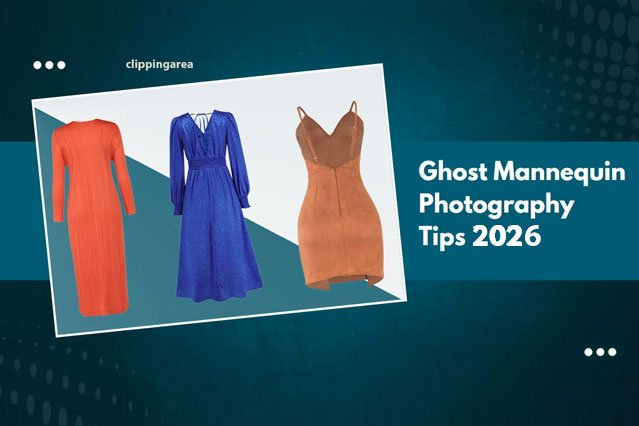
Ghost mannequin photography is a professional fashion product imaging technique that makes garments appear as if they are worn by an invisible model. The process involves photographing apparel on a mannequin and then digitally removing the mannequin through advanced photo editing. Multiple images are blended together to reveal the garment’s natural shape, neckline, sleeves, and inner structure.
This method is widely used in fashion eCommerce because it creates a realistic 3D appearance without the distraction of a human model. The result is a clean, consistent, and professional product image that helps customers understand how the clothing fits and drapes on the body.
Why Use Ghost Mannequin Photography in 2026?
As online fashion retail becomes more competitive, high-quality visuals play a major role in customer trust and purchasing decisions.
-
Professional presentation — Delivers clean, uniform visuals across your entire product catalog.
-
Higher conversion rates — Shoppers can clearly see garment shape, construction, and fit.
-
Cost-efficient solution — Eliminates the need to hire live models for every photoshoot.
-
Scalable for large stores — Ideal for brands with hundreds or thousands of SKUs.
-
SEO-friendly product images — Improves engagement, dwell time, and visibility in Google Images and marketplaces.
-
Brand consistency — Creates a uniform visual identity across all collections.
How Ghost Mannequin Photography Works
The invisible mannequin effect is achieved by combining professional photography with precision retouching.
-
The garment is photographed on a mannequin to capture its outer shape.
-
A second image is taken of the inside areas such as the neckline, collar, or sleeve.
-
The mannequin is removed digitally.
-
Both images are merged to create a complete, natural-looking product photo.
This technique is often called neck joint service, invisible mannequin editing, or mannequin removal editing.
How to Create a Ghost Mannequin Effect (Step-by-Step)
Step 1: Prepare Your Garment
-
Steam or iron the clothing to remove wrinkles.
-
Style it neatly on the mannequin (ensure symmetry).
Step 2: Photograph the Garment
-
Use even lighting to avoid harsh shadows.
-
Capture at least two shots:
-
Front view with mannequin.
-
Inside view (neck, inner labels, or sleeves).
-
Step 3: Import Images into Editing Software
-
Use Adobe Photoshop or similar tools.
Step 4: Remove the Mannequin
-
Use the Pen Tool or Layer Mask to cut out the mannequin.
Step 5: Merge Multiple Images
-
Combine the inside garment shot with the outer shot to create the neck joint.
Step 6: Clean & Finalize
-
Adjust colors for accuracy.
-
Retouch any folds or dust spots.
-
Export in high resolution for web or print.
Ghost Mannequin Photography vs. Flat Lay: Which Should You Choose?
| Feature | Ghost Mannequin | Flat Lay |
|---|---|---|
| Look & Presentation | 3D, life-like | 2D, top-down |
| Best For | Jackets, dresses, shirts | T-shirts, accessories |
| Editing Time | Moderate | Low |
| Conversions | Higher (most cases) | Good, but less detail |
Cost of Ghost Mannequin Editing in 2026
-
DIY editing: Free if you already own software, but time-consuming and requires technical skill.
-
Professional service: Typically ranges from $0.50 to $2.00 per image depending on garment complexity and retouching requirements.
-
Advanced garments: Coats, suits, and layered clothing may cost more due to detailing work.
At Clipping Area, bulk discounts are available for eCommerce businesses and large product catalogs.
Best Practices for Ghost Mannequin Photography
-
Maintain consistent lighting and camera angles for all products.
-
Use the same mannequin size for uniformity.
-
Always capture multiple angles for flexibility in editing.
-
Keep background pure white (#FFFFFF) for marketplace compliance (Amazon, eBay, Zalando).
Case Study: How Ghost Mannequin Images Improved an Online Clothing Store’s Sales
A mid-size fashion retailer replaced flat lay photos with invisible mannequin images across 120 product listings.
Results after 30 days:
-
Conversion rate increased by 18%
-
Average time on product pages improved by 27%
-
Return rate dropped by 11%
FAQs About Ghost Mannequin Services
Q1: What is the ghost mannequin effect in Photoshop?
It is an image-editing method where the mannequin is digitally removed from clothing photos, creating the appearance that the garment is worn by an invisible model.
Q2: How long does mannequin removal editing take?
Editing time usually ranges from 5 to 15 minutes per image, depending on garment structure, folds, and neckline complexity.
Q3: Can invisible mannequin images increase online sales?
Yes. 3D-style apparel images help shoppers understand fit and shape better, which improves buyer confidence and can reduce product returns.
Q4: Do I need special equipment for this type of product photography?
A DSLR or mirrorless camera, proper lighting, and a well-fitted mannequin are recommended to achieve professional-quality fashion product images.
Q5: What is the difference between ghost mannequin and invisible mannequin editing?
There is no technical difference. Both terms describe the same process of removing the mannequin while preserving the garment’s natural shape.
Q6: Is this editing technique suitable for all clothing types?
It works best for structured garments like jackets, shirts, dresses, and trousers. Sheer or loose fabrics may require additional retouching for realistic results.
Q7: Can professional editors fix wrinkles and reshape fabric?
Yes. Along with mannequin removal, retouchers can smooth creases, correct fabric distortion, and enhance the overall presentation of the apparel.
Q8: How much does professional ghost mannequin editing cost?
Prices typically range from $0.50 to $20 per image, depending on complexity, retouching needs, and order volume. Bulk orders often qualify for discounted rates.
Q9: Does this editing style work for children’s clothing?
Yes. The same apparel photo editing process can be applied to kids’ and baby garments, with careful proportion adjustments.
Q10: How do mannequin-free product photos help eCommerce SEO?
High-quality fashion images improve user engagement, lower bounce rates, and increase visibility in Google Images and marketplace search results.
Why Choose Clipping Area for Ghost Mannequin Services?
At Clipping Area, we provide high-volume, fast-turnaround invisible mannequin editing for global fashion brands.
-
Skilled retouchers with years of fashion industry experience
-
Bulk order discounts for online clothing stores
-
Free trial available to evaluate image quality
-
Dedicated quality control for consistent results