Why This Comparison Matters for Ecommerce Images
In ecommerce, product images are not just visuals — they are a critical part of the sales process.
Shoppers depend on product photos to evaluate:
-
Shape and structure
-
Edge quality and fine details
-
Transparency in materials (glass, fabric, hair, fur)
-
Overall brand professionalism
When images appear poorly cut, unnatural, or badly blended:
-
Customer trust decreases
-
Conversion rates drop
-
Product returns increase
Understanding the difference between clipping path and image masking allows you to choose the correct technique for each product image and avoid these costly mistakes.
What Is a Clipping Path?
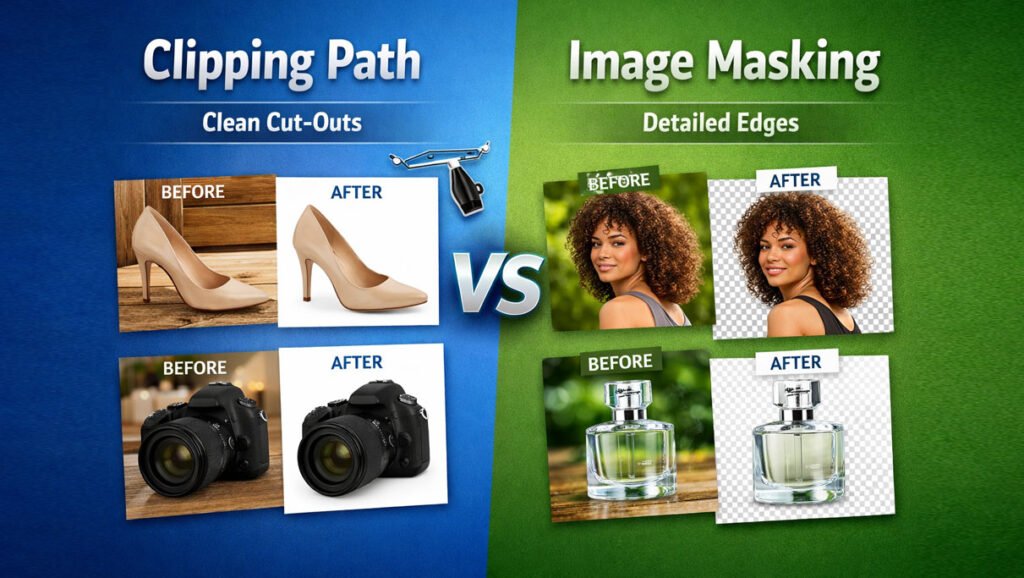
A clipping path is a precise outline drawn around an object to separate it from its background. It is created manually using the Pen Tool in professional photo editing software such as Adobe Photoshop.
This technique is mainly used for background removal and works best with products that have clean, well-defined edges.
A clipping path creates a vector-based selection, which means the cut-out remains sharp and accurate without losing image quality. When done professionally, it produces smooth, natural-looking edges suitable for ecommerce product images.
Key Characteristics of Clipping Path
-
Uses hard, defined edges
-
Best for objects with solid, straight, or smooth outlines
-
Produces clean cut-outs
-
Ideal for background removal
Clipping paths are vector-based selections, meaning they are extremely precise when done manually.
How Clipping Path Works (Step-by-Step)
-
An editor manually draws a path around the object
-
The background is removed
-
The object is placed on a new background (often white)
-
Final refinements are applied
Professional clipping path work is always hand-drawn, never automatic.
Best Use Cases for Clipping Path
Clipping path is ideal for:
-
Bottles
-
Tools
-
Jewelry (with simple edges)
These products have clear, solid outlines that don’t require transparency.
What Clipping Path Is NOT Good For
Clipping path struggles with:
-
Hair
-
Fur
-
Feathers
-
Transparent objects (glass, smoke)
-
Soft fabric edges
Trying to clip these using a path results in:
❌ Jagged edges
❌ Unnatural cut-outs
❌ Fake appearance
This is where image masking becomes essential.
What Is Image Masking? (Complete Explanation)
Image masking is a pixel-based selection technique used to handle complex edges and transparency.
Instead of cutting an object out completely, masking blends the object naturally with the background while preserving fine details.
Key Characteristics of Image Masking
-
Handles soft and complex edges
-
Preserves transparency
-
Ideal for hair, fur, smoke, glass, fabric
-
Creates realistic transitions
Image masking is more advanced and time-consuming than clipping path—but essential for realism.
Types of Image Masking (Professional Breakdown)
1. Layer Masking
Used to hide or reveal parts of an image non-destructively.
2. Alpha Channel Masking
Used for very complex selections like hair and fur.
3. Transparency Masking
Used for glass, water, smoke, and sheer fabric.
Each masking type serves a specific purpose and requires manual skill.
Best Use Cases for Image Masking
Image masking is ideal for:
-
Models with hair
-
Fur or feather products
-
Transparent bottles
-
Glassware
-
Sheer clothing
-
Smoke or shadow effects
If fine details matter, masking is the correct choice.
Clipping Path vs Image Masking: Core Differences
| Feature | Clipping Path | Image Masking |
|---|---|---|
| Edge Type | Hard & defined | Soft & complex |
| Transparency | ❌ No | ✅ Yes |
| Difficulty | Medium | High |
| Time Required | Less | More |
| Best For | Solid objects | Hair, fur, glass |
| Ecommerce Use | Very common | Selective but critical |
👉 Neither is “better” overall — each is better for specific image types.
Why Many Brands Choose the Wrong One (Costly Mistake)
Common mistakes include:
-
Using clipping path for hair images
-
Using masking for simple products (wasting budget)
-
Relying on AI tools for both
-
Not combining techniques
Choosing the wrong method leads to poor visual quality.
Professional Reality: Most High-End Images Use BOTH
In professional post-production, editors often:
-
Use clipping path for the main object
-
Use image masking for edges, shadows, or transparency
This hybrid approach delivers:
✔ Clean outlines
✔ Natural edges
✔ Realistic results
Ecommerce Impact: How the Right Choice Improves Sales
Using the correct technique:
-
Improves image realism
-
Builds trust
-
Reduces returns
-
Increases conversion rate
Poor cut-outs instantly signal low quality to customers.
Clipping Path vs Image Masking for Ecommerce Platforms (Real-World Use Cases)
Choosing between clipping path and image masking becomes much clearer when you look at where and how images are used. Different ecommerce platforms have different visual requirements, and using the wrong technique can hurt both conversion rate and compliance.
Clipping Path vs Image Masking for Amazon
Amazon prioritizes:
-
Clean white backgrounds
-
Clear product visibility
-
Accurate representation
-
Minimal distractions
When Clipping Path Is Best for Amazon
Clipping path works best for:
-
Shoes
-
Bags
-
Electronics
-
Bottles
-
Furniture
-
Tools
These products have solid edges and don’t require transparency.
When Image Masking Is Required for Amazon
Image masking is necessary for:
-
Apparel with loose threads or fabric edges
-
Products with hair, fur, or feathers
-
Glass or transparent packaging
👉 Amazon success depends on choosing the correct method, not just removing the background.
Clipping Path vs Image Masking for Shopify & DTC Stores

Shopify and direct-to-consumer stores allow more creative freedom—but that doesn’t mean lower standards.
Best Practice for Shopify Stores
Top-performing Shopify brands use:
-
Clipping path for most product images
-
Image masking for apparel, hair, sheer fabric, and lifestyle images
This approach ensures:
✔ Professional catalog consistency
✔ Natural-looking edges
✔ Better product page engagement
Fashion & Apparel Photography: Which Technique Wins?
Fashion photography often involves complex edges, making this one of the most misunderstood areas.

When to Use Clipping Path in Fashion
-
Shoes
-
Bags
-
Accessories
-
Folded garments with clean edges
When to Use Image Masking in Fashion
-
Models with hair
-
Fur-lined clothing
-
Sheer dresses
-
Lace fabrics
-
Ghost mannequin inner details
Trying to use clipping path for hair or sheer fabric results in unnatural, cheap-looking images.
Cost Comparison: Clipping Path vs Image Masking
Many brands choose based on price alone—this is a mistake.
Clipping Path (Lower Cost)
-
Faster to execute
-
Ideal for bulk products
-
Lower per-image cost
Image Masking (Higher Cost)
-
Time-intensive
-
Requires advanced skill
-
Essential for realism
👉 The real cost is not the editing price—it’s lost sales from poor images.
ROI Perspective: Which Delivers Better Returns?
| Factor | Clipping Path | Image Masking |
|---|---|---|
| Editing Cost | Lower | Higher |
| Visual Quality | High (simple objects) | Very High (complex edges) |
| Conversion Impact | High | Very High |
| Return Reduction | Medium | High |
Using the correct technique produces better ROI, even if the upfront cost is higher.
AI Tools vs Manual Editing (The Honest Truth)
AI tools promise speed—but they still struggle with:
-
Hair strands
-
Fur texture
-
Transparent materials
-
Natural shadows
AI Editing Problems
❌ Jagged edges
❌ Loss of detail
❌ Unnatural blending
Manual Editing Advantages
✔ Precision
✔ Realism
✔ Control
✔ Consistency
Professional studios like Clipping Area rely on manual techniques because quality directly affects ecommerce performance.
Common Ecommerce Editing Mistakes (And How to Avoid Them)
❌ Mistake 1: Using Clipping Path for Hair
✔ Fix: Use image masking for all hair and fur details.
❌ Mistake 2: Overusing Masking on Simple Products
✔ Fix: Use clipping path where edges are clean to save cost.
❌ Mistake 3: Inconsistent Editing Across Catalog
✔ Fix: Define a clear editing standard for all products.
❌ Mistake 4: Relying Only on AI Tools
✔ Fix: Use professional manual editing for sales images.
Professional Workflow: How Experts Combine Both Techniques
High-end post-production rarely uses just one technique.
Professional workflow:
-
Clipping path for main object separation
-
Image masking for edges, hair, transparency
-
Retouching for fabric & dust
-
Color correction for consistency
-
Final quality control
This hybrid approach ensures maximum realism and conversion power.
How the Right Choice Impacts Conversion Rate
Images edited with the correct method:
-
Look natural
-
Build trust instantly
-
Reduce hesitation
-
Lower return rates
Customers may not know why an image looks good—but they immediately sense quality.
Why Brands Trust Professional Editing Studios
Brands choose professional studios because they need:
-
Consistent quality
-
Scalable production
-
Ecommerce-ready images
-
Expert decision-making
Clipping Area helps brands decide which technique to use for each image, not just edit blindly.
How to Decide: Clipping Path or Image Masking?
If you remember nothing else from this guide, remember this:
The right choice depends on the edge complexity of your product.
Use this practical framework to decide instantly.
Step 1: Look at the Product Edges
Ask yourself:
-
Are the edges solid and well-defined?
-
Or are they soft, transparent, or detailed?
✅ Choose Clipping Path If:
-
The object has hard edges
-
The shape is clean and solid
-
No transparency is needed
Examples:
-
Shoes
-
Bags
-
Electronics
-
Furniture
-
Bottles
-
Boxes
✅ Choose Image Masking If:
-
The edges are soft or complex
-
Transparency is involved
-
Fine details must be preserved
Examples:
-
Hair or fur
-
Sheer fabric
-
Lace clothing
-
Glass or water
-
Smoke or shadows
Step 2: Consider the Platform You’re Selling On
Marketplaces (Amazon, eBay, Walmart)
-
Clean backgrounds
-
Clear product focus
-
Accurate edges
➡ Use clipping path for solid products
➡ Use image masking for apparel, hair, or transparent items
Shopify & DTC Stores
-
More visual flexibility
-
Higher branding expectations
➡ Use clipping path for most catalog images
➡ Use image masking for fashion, lifestyle, and hero images
Step 3: Think About Conversion, Not Cost
Many brands choose the cheapest option—but this is short-sighted.
-
Poor edges = low trust
-
Low trust = low conversion
-
Low conversion = lost revenue
👉 The right technique always pays for itself.
Buyer’s Checklist: Choosing the Right Photo Editing Service
Before hiring any provider, confirm they offer:
✔ Manual clipping path (no auto tools)
✔ Advanced image masking for hair & transparency
✔ Sample work that matches your products
✔ Consistent editing across bulk orders
✔ Clear turnaround time
✔ Revision policy
✔ Quality control process
If even one item is missing, keep looking.
Why Professional Judgment Matters More Than the Tool
Tools don’t create quality—decisions do.
The biggest advantage of working with a professional studio is not software; it’s knowing which technique to apply to each image.
Professional editors:
-
Analyze product type
-
Choose the correct method
-
Combine techniques when needed
-
Ensure ecommerce-ready output
That’s why experienced studios outperform automated solutions.
Why Brands Choose Clipping Area for Clipping Path & Image Masking
Clipping Area is a professional post-production studio serving ecommerce brands worldwide.
We specialize in:
-
Hand-drawn clipping path services
-
Advanced image masking
-
Ghost mannequin editing
-
Photo retouching
-
Ecommerce image optimization
What Makes Us Different
✔ Manual editing only (no AI shortcuts)
✔ Technique selection based on product type
✔ Bulk order capability
✔ Dedicated quality control
✔ Consistent results at scale
Our goal is simple: help your images convert better.
How Correct Editing Increased Sales for an Apparel Brand
A mid-sized fashion retailer selling women’s dresses contacted Clipping Area after noticing two problems:
-
High product return rate
-
Low conversion on model-based product images
The Problem
Their product photos used clipping path for all images, including:
-
Models with hair
-
Sheer fabric dresses
-
Lace and soft edges
This caused:
-
Jagged hair edges
-
Unnatural fabric outlines
-
Loss of transparency details
Customers complained that:
“The dress looks different from the photos.”
Which led to:
❌ Lower trust
❌ Higher returns
❌ Poor brand perception
The Solution
Clipping Area redesigned their editing workflow:
-
Clipping path used for:
-
Solid parts of garments
-
Background removal
-
-
Image masking used for:
-
Hair and loose threads
-
Sheer and lace fabric
-
Soft garment edges
-
-
Added:
-
Color correction
-
Shadow refinement
-
Consistent background styling
-
This hybrid method preserved realism while keeping clean catalog consistency.
The Results (After 30 Days)
After replacing their old images with correctly edited ones:
-
📈 Conversion rate increased by 17%
-
📉 Product return rate dropped by 21%
-
⏱ Time on product pages increased
-
💬 Customer complaints about “wrong look” reduced significantly
The brand also reported higher engagement on their Shopify product pages and improved ad performance because images looked more realistic and trustworthy.
Frequently Asked Questions
What is the main difference between clipping path and image masking?
Clipping path is used for hard edges; image masking is used for soft or transparent edges.
Is image masking better than clipping path?
Not always. Masking is better for complex edges, but clipping path is ideal for simple products.
Can clipping path and image masking be used together?
Yes. Professional editors often combine both for the best results.
Is image masking more expensive?
Yes, because it requires more time and skill—but it delivers better realism where needed.
Are AI background removal tools good enough?
No. They struggle with hair, fur, and transparency, leading to poor results.
Which method is best for ecommerce?
The correct method depends on the product. Using the right one improves trust and conversions.
Does professional editing really affect sales?
Yes. Clean, realistic images directly impact conversion rate and return rate.
Final Verdict: Clipping Path vs Image Masking
There is no “better” technique overall—only the right technique for the right image.
Use Clipping Path When:
✔ Edges are solid
✔ Speed and consistency matter
✔ Bulk products need clean cut-outs
Use Image Masking When:
✔ Details are complex
✔ Transparency matters
✔ Realism is critical
Brands that understand this distinction:
-
Look more professional
-
Build trust faster
-
Convert better
-
Scale more efficiently
Final Takeaway for Ecommerce Brands
If you want:
-
Professional-looking product images
-
Higher conversion rates
-
Lower returns
-
Stronger brand credibility
You must stop guessing and start using the correct editing technique.
That’s the difference between average ecommerce images and high-performing sales visuals.
🚀 Ready to Get Professional Results?
Get a free sample edit and see which method works best for your product images.