Understanding Amazon Image Requirements for Footwear Products
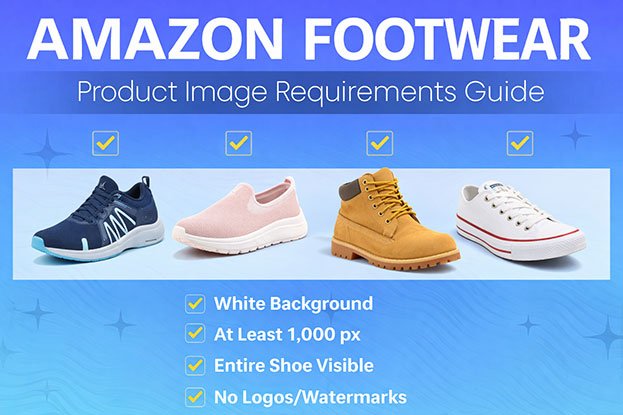
Amazon footwear product image requirements are important for sellers who want their shoe listings to perform well on ecommerce marketplaces. When product images follow Amazon’s guidelines, listings appear more professional, trustworthy, and easier for customers to evaluate.
Footwear brands selling through Amazon must ensure their product images meet strict standards for background, size, quality, and presentation. These requirements help maintain a consistent shopping experience across the platform and allow customers to compare products easily.
However, many sellers unknowingly upload shoe product images that do not fully meet Amazon’s guidelines. Problems such as gray backgrounds, low resolution, inconsistent shadows, or poor cropping can reduce listing quality and affect customer trust.
Understanding Amazon footwear product image requirements helps sellers prepare optimized product photos that meet marketplace standards and improve listing performance.
Why Amazon Product Image Requirements Matter for Footwear
Customers cannot touch or try on shoes when shopping online. Product images therefore play a crucial role in helping buyers evaluate the design, materials, and overall quality of the footwear.
Well-optimized shoe product images help:
-
clearly display the shape and style of the shoe
-
highlight material textures and stitching details
-
show accurate colors and design elements
-
build customer confidence in the product
When footwear images meet Amazon’s requirements, they appear more professional and trustworthy. This improves the overall shopping experience and can positively impact conversion rates.
Main Image Requirements for Amazon Shoe Listings
Amazon has several rules that apply specifically to the main product image, which is the first image customers see in search results.
Pure White Background
Amazon requires the main product image to have a pure white background (RGB 255,255,255). This allows products to appear clean and consistent across the marketplace.
A pure white background helps footwear listings:
-
stand out in search results
-
look professional and organized
-
meet Amazon’s compliance standards
Images with gray or uneven backgrounds may not meet the platform’s guidelines.
Product Must Fill Most of the Frame
Amazon recommends that the shoe occupy at least 85% of the image area. The product should be clearly visible without too much empty space around it.
This ensures the shoe remains easily recognizable when displayed as a small thumbnail in search results.
No Text, Logos, or Graphics
The main product image cannot include:
-
promotional text
-
logos or watermarks
-
badges or icons
-
additional design graphics
Amazon wants the main image to focus solely on the product itself.
High Image Resolution
Amazon recommends product images with a minimum size of 1000 pixels on the longest side. Higher resolution images enable the zoom feature, allowing customers to examine shoe details more closely.
Zoom functionality is particularly important for footwear products because customers want to inspect:
-
stitching quality
-
material texture
-
sole patterns
-
design elements
High-resolution images help buyers feel more confident about their purchase.
Why Footwear Images Often Fail Amazon Guidelines
Even experienced sellers sometimes upload images that do not fully meet Amazon’s requirements. Shoe photography presents unique challenges due to shadows, reflective materials, and complex product shapes.
Common problems include:
-
backgrounds that are not pure white
-
uneven shadows around the shoe
-
inconsistent lighting across images
-
product positioned too small in the frame
-
low-resolution images that do not support zoom
These issues can reduce the professional appearance of a listing and affect customer trust.
Common Image Mistakes in Amazon Footwear Listings (And How to Fix Them)
Even when footwear brands follow basic photography practices, many product images still fail to meet footwear product image requirements for Amazon listings. Small mistakes in lighting, background, or editing can make a listing look unprofessional and reduce customer trust.
Below are the most common image problems that appear in Amazon shoe listings and how they can be corrected.
Background Not Truly Pure White
One of the most frequent issues in footwear product images is a background that appears white but is actually light gray or uneven.
This problem usually happens because of:
-
inconsistent lighting during photography
-
shadows falling on the background
-
poor background removal during editing
For Amazon listings, the background must be pure white (RGB 255,255,255). If the background color is slightly gray or yellow, the image may not comply with marketplace standards.
Solution:
Professional background correction ensures the shoe is placed on a perfectly white background while maintaining natural product shadows.
Excessive Shadows Around the Shoe
Shoes naturally cast shadows because of their height and shape. However, strong or uneven shadows can make the product image look messy.
Common shadow problems include:
-
heavy shadows behind the shoe
-
shadows extending into the background
-
multiple shadow directions across product images
Inconsistent shadows can make a catalog look unprofessional when customers browse several products.
Solution:
Balanced shadow editing keeps a subtle shadow under the shoe so the product looks realistic while maintaining a clean background.
Low Resolution Product Images
Low-quality images are another common issue in Amazon shoe listings. When product images are too small or compressed, customers cannot zoom in to inspect product details.
Important details such as stitching, texture, and materials may become blurry.
This often leads to:
-
lower customer confidence
-
reduced click-through rates
-
decreased conversion rates
Solution:
Use high-resolution images that support Amazon’s zoom feature. Images should be large enough for customers to clearly view the shoe design.
Inconsistent Angles Across Product Images
Many footwear listings include multiple product photos such as front view, side view, and sole view. When these images are photographed at inconsistent angles or lighting conditions, the listing can appear unorganized.
Customers comparing products may find it difficult to evaluate the design.
Solution:
Maintain consistent angles and lighting for all product images. This creates a professional catalog appearance.
Color Differences Between Product Images
Footwear brands often sell multiple color variations of the same shoe model. If product images are edited inconsistently, the colors may appear slightly different between variants.
Color inconsistency can confuse customers and increase return rates.
Solution:
Accurate color correction ensures that each product image represents the real color of the shoe while keeping the catalog consistent.
Why These Problems Are Common in Footwear Photography
Shoes are more complex to photograph than many other ecommerce products. Their curved shapes, materials, and shadows make it difficult to achieve perfectly clean images directly from the camera.
Because of this, professional image editing is often required to prepare footwear photos for Amazon listings.
How to Optimize Footwear Product Images for Amazon Listings
To successfully sell shoes on Amazon, sellers must ensure their images follow all footwear product image requirements for Amazon listings while also presenting products clearly and professionally. Proper image optimization not only helps listings meet Amazon guidelines but also improves product visibility and customer trust.
Below are key steps footwear brands should follow when preparing product images for Amazon.
1. Use a Pure White Background
The main product image must have a pure white background (RGB 255,255,255). A clean white background allows the product to stand out and ensures consistency across the Amazon marketplace.
White backgrounds help footwear listings:
-
look clean and professional
-
appear consistent in search results
-
meet Amazon image compliance standards
Professional background removal ensures the shoe is separated cleanly from its original background and placed on a pure white canvas.
2. Show the Product Clearly
Amazon requires the product to fill at least 85% of the image frame. The shoe should be clearly visible without unnecessary empty space around it.
The main image should focus only on the footwear and avoid distractions. Customers should immediately recognize the product when browsing search results.
3. Maintain Natural Shadows
While backgrounds must remain clean, the product should not appear as if it is floating. Subtle shadows beneath the shoe create depth and realism.
Balanced shadow editing ensures that:
-
the shoe looks naturally placed
-
the image remains clean and professional
-
shadows remain consistent across the catalog
Maintaining realistic shadows improves visual quality without violating Amazon’s background guidelines.
4. Use High-Resolution Images
High-quality product images help customers inspect the shoe in detail. Amazon recommends images that are at least 1000 pixels on the longest side to enable zoom functionality.
Zoom allows customers to examine:
-
stitching quality
-
sole design
-
material texture
-
overall craftsmanship
Clear product images increase buyer confidence and often lead to higher conversion rates.
5. Maintain Consistency Across Product Catalogs
Footwear brands usually sell multiple styles and color variants. If product images vary in background tone, lighting, or angle, the catalog may appear unprofessional.
Consistency across images ensures that customers can easily compare different products.
Consistent product images include:
-
identical background color
-
similar lighting conditions
-
balanced shadows
-
uniform product positioning
A consistent catalog strengthens brand credibility and improves the overall shopping experience.
Case Study: Improving Amazon Shoe Listings with Image Optimization
A growing footwear brand selling athletic sneakers on Amazon struggled with inconsistent product images across their catalog. Their shoe photos were taken in multiple studio sessions, which caused background and lighting variations.
The Problem
Their product images had several issues:
-
backgrounds appeared slightly gray instead of pure white
-
shadows varied across images
-
some products were cropped inconsistently
-
lighting differences made colors look uneven
These problems made the catalog look unprofessional and reduced customer confidence.
The Solution
A professional editing workflow was applied to standardize the product images.
The process included:
-
precise background removal and replacement with pure white
-
shadow correction for consistent product grounding
-
color correction for accurate product appearance
-
catalog-wide consistency checks
Results
After updating their product images, the brand saw measurable improvements:
-
23% increase in click-through rates on product listings
-
18% improvement in conversion rate
-
improved visual consistency across the catalog
Professional image optimization helped their footwear listings appear more trustworthy and easier for customers to evaluate.
Final Thoughts
Meeting footwear product image requirements for Amazon listings is essential for sellers who want to compete successfully in the online marketplace. Clean backgrounds, high-resolution images, and consistent product presentation help listings look more professional and trustworthy.
For footwear brands selling on Amazon, optimized product images can lead to:
-
better product visibility
-
improved click-through rates
-
stronger customer trust
-
higher conversion rates
High-quality product images are not just a visual improvement—they are a key part of successful ecommerce strategy.
🔎 Learn more: How to Remove Background from Shoe Product Photos for Ecommerce
Need Help Preparing Footwear Product Images for Amazon?
If your shoe product photos have background issues, inconsistent shadows, or color inaccuracies, professional image editing can help prepare them for Amazon listings.
Send us a few sample images and see how optimized product photos can improve the appearance and performance of your footwear catalog.
Frequently Asked Questions
What background color does Amazon require for shoe product images?
Amazon requires the main product image to have a pure white background (RGB 255,255,255).
What size should Amazon shoe product images be?
Images should be at least 1000 pixels on the longest side to enable zoom functionality.
Can Amazon product images include text or logos?
The main product image cannot include text, logos, or promotional graphics.
Why do some Amazon shoe images look gray instead of white?
This usually happens because of lighting issues or improper background editing during product photography.
Do better product images increase Amazon sales?
Yes. High-quality product images improve product visibility, customer trust, and conversion rates.