Real estate photography plays a major role in attracting buyers online. In fact, most home buyers first see a property through listing photos before deciding whether to schedule a showing.
When listing photos look dark, blurry, or unnatural, buyers may lose interest before they even read the property details.
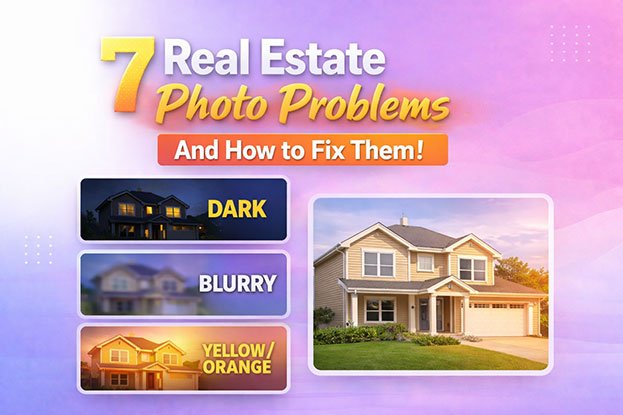
Many real estate photographers face common image issues such as dark interiors, yellow color casts, blown-out windows, and distorted walls.
In this guide, we’ll explain 7 common real estate photo problems and how professional editing fixes them to make listings look brighter, cleaner, and more attractive to buyers.
Common Real Estate Photo Problems at a Glance
The most common issues in real estate photography include:
• dark interior photos
• yellow or orange color casts
• blurry images
• blown-out windows
• unrealistic colors
• perspective distortion
• poor HDR blending
Professional real estate photo editing corrects these problems to create bright, natural, and visually appealing property images.
1. Real Estate Photos Look Too Dark
One of the most common problems in property photography is dark interiors. When rooms appear underexposed, important details disappear and the space feels smaller than it actually is.
Why It Happens
Dark photos usually happen because of:
• insufficient interior lighting
• incorrect camera exposure
• shooting directly toward bright windows
• poor HDR blending
How Professional Editors Fix It
Editors correct dark real estate photos by:
• adjusting exposure and shadows
• HDR blending multiple exposures
• balancing window light and room lighting
• enhancing brightness while keeping natural contrast
👉 Read the full guide: Why Real Estate Photos Look Dark
2. Real Estate Photos Look Yellow
Sometimes property photos appear overly warm or yellow, making walls and furniture look unnatural.
Why It Happens
This usually occurs when indoor lighting affects the camera’s white balance.
Common causes include:
• tungsten light bulbs
• mixed lighting sources
• incorrect white balance settings
How Editors Fix It
Professional editors remove yellow tones using:
• white balance correction
• color cast removal
• temperature adjustments
👉 Read the full guide: Why Real Estate Photos Look Yellow
3. Real Estate Photos Look Orange
Orange color casts are another frequent issue in interior photography.
This problem often appears when natural daylight mixes with warm indoor lights.
Why It Happens
Orange tones are typically caused by:
• mixed lighting conditions
• camera auto white balance errors
• strong warm lighting indoors
How Editors Fix It
Editors remove orange tones using advanced color correction techniques such as:
• selective color adjustment
• color temperature balancing
• masking and localized color correction
👉 Read the full guide: Why Real Estate Photos Look Orange
4. Real Estate Photos Look Blurry
Sharp images are essential for professional property listings. Blurry photos can instantly make a listing look unprofessional.
Why It Happens
Blur in real estate photos usually comes from:
• camera shake
• slow shutter speed
• incorrect focus
• shooting in low light
How Editors Improve Image Clarity
Professional editors enhance sharpness using:
• detail sharpening
• noise reduction
• clarity enhancement
However, extremely blurry images may require reshooting.
👉 Read the full guide: Why Real Estate Photos Look Blurry
5. Windows Appear Completely White
Overexposed windows are a common challenge in interior photography.
When the outside light is much brighter than the room, cameras cannot properly expose both areas at the same time.
Why It Happens
Cameras struggle to capture:
• bright outdoor light
• darker indoor environments
This often results in blown-out windows.
How Editors Fix Window Exposure
Professional real estate editors perform window pull editing, which involves:
• blending multiple exposures
• masking window areas
• restoring natural outdoor views
This technique creates realistic and balanced property images.
6. Colors Look Unrealistic
Sometimes real estate photos show inaccurate wall colors or strange tones.
This makes the property appear unnatural and poorly photographed.
Why It Happens
This can happen because of:
• incorrect white balance
• mixed lighting sources
• poor editing workflow
How Editors Fix Color Issues
Editors restore natural color using:
• color correction
• white balance adjustment
• color grading techniques
7. Vertical Lines Look Crooked
If walls, doors, or windows appear tilted in real estate photos, it’s usually due to perspective distortion.
Why It Happens
This occurs when the camera is tilted up or down during shooting.
How Editors Fix Perspective
Editors correct this problem using perspective correction tools that straighten:
• walls
• doors
• windows
• vertical architectural lines
This makes the property look clean and professional.
Why Professional Real Estate Photo Editing Matters
According to real estate marketing studies, listings with professional photos receive significantly more online engagement.
Well edited real estate images can:
• increase listing views by up to 118 percent
• attract more buyer inquiries
• help homes sell faster
This is why many photographers and real estate agencies outsource their photo editing to professional editing companies.
Typical Real Estate Photo Editing Workflow
Professional real estate photo editing usually follows a structured process.
The typical workflow includes:
-
exposure and brightness correction
-
HDR blending for balanced lighting
-
white balance and color correction
-
window pull editing
-
perspective correction
-
sharpening and noise reduction
-
final color grading
This process ensures that property photos look clean, bright, and natural while accurately representing the space.
Who Uses Real Estate Photo Editing Services
Professional real estate photo editing services are commonly used by:
• real estate photographers
• property marketing agencies
• real estate agents
• real estate media companies
• architectural photographers
Outsourcing editing helps photographers save time and deliver consistent image quality to their clients.
Final Thoughts
Real estate photography is one of the most important factors influencing how buyers perceive a property online.
Common issues such as dark interiors, yellow color casts, blurry images, and distorted walls can make listings look unprofessional and reduce buyer interest.
Professional real estate photo editing corrects these problems and helps create bright, balanced, and visually appealing property images that attract more attention.
For many photographers and agencies, outsourcing real estate photo editing saves time while ensuring every listing looks its best.
Need Professional Real Estate Photo Editing?
If you’re a real estate photographer or agency looking to improve listing photos, professional editing can make your properties look brighter, cleaner, and more appealing to buyers.
We provide expert real estate photo editing including HDR blending, sky replacement, window pull editing, and advanced color correction.
Outsource your editing to us, save hours of post-production work, and deliver stunning property images your clients will love.
FAQ
Why do real estate photos look dark?
Real estate photos often look dark because of poor interior lighting, incorrect camera exposure, or strong window light overpowering the room.
Why do real estate photos look yellow?
Yellow tones usually occur because of warm indoor lighting or incorrect white balance settings on the camera.
Why do real estate photos look orange?
Orange color casts happen when warm indoor lights mix with natural daylight.
How do editors fix real estate photos?
Professional editors fix real estate photos using techniques such as HDR blending, color correction, perspective correction, and exposure adjustment.
Why do real estate photos look dark even with good lighting?
Real estate photos can still look dark even when a room has lighting because cameras struggle to balance interior lighting and bright window light. Without proper exposure settings or HDR blending, the camera often underexposes the room.
Why do real estate photos look yellow indoors?
Yellow tones usually appear because of warm indoor lighting such as tungsten or incandescent bulbs. When the camera’s white balance is not adjusted properly, these lights create a yellow color cast in the photo.
Why do real estate photos look orange in some rooms?
Orange color casts often occur when warm indoor lights mix with natural daylight from windows. This mixed lighting can confuse the camera’s white balance and create an orange tone.
What is HDR in real estate photography?
HDR stands for High Dynamic Range. It combines multiple exposures of the same photo to balance bright windows and darker interiors, creating a well-exposed image.
What is window pull in real estate photo editing?
Window pull is a technique used to restore the outside view through windows. Editors blend multiple exposures to balance interior lighting with the bright outdoor scene.
Why do real estate photos look blurry?
Blurry real estate photos often happen because of camera shake, slow shutter speed, or incorrect focus. Low lighting conditions can also force the camera to use slower shutter speeds, which increases blur.
How do professionals edit real estate photos?
Professional editors use specialized techniques such as HDR blending, color correction, exposure balancing, perspective correction, and window pull editing to improve property photos.
Why are straight lines important in real estate photography?
Straight vertical lines make a property look natural and professional. Crooked walls or tilted windows can make a room look distorted or poorly photographed.
How can photographers avoid color problems in real estate photos?
Photographers can reduce color issues by setting correct white balance, using consistent lighting, and shooting in RAW format to allow better editing control.
Do real estate photographers edit every photo?
Yes. Most real estate photographers edit their photos or outsource editing because raw camera images rarely look perfect without adjustments.
How long does real estate photo editing take?
Professional real estate photo editing usually takes between 12 to 24 hours, depending on the number of images and the editing complexity.
Why do real estate photographers outsource photo editing?
Many photographers outsource editing to save time, maintain consistent quality, and focus more on shooting properties rather than spending hours editing images.