You finished your prints. They look great. Now the gallery asks for your wall labels, and you get stuck on one small line: the medium. If you are wondering how to label photography medium for exhibitions, you are not alone. Many photographers write “photo” or “digital print” and move on. That is a missed chance.

The medium line tells viewers, buyers, and curators exactly what they are looking at. It shows care. It builds trust. It can even affect price.
At Clipping Area, we have prepared images for print and exhibition since 2014. We work with photographers, galleries, and brands every day. In this guide, we share what we have learned. You will get simple rules, real label examples, and a clear format you can copy today.
Quick Answer: How Do You Label Photography Medium?
To label photography medium for an exhibition, name the print process first, then the support or paper, then any mounting. For example: “Archival pigment print on cotton rag paper” or “Gelatin silver print, mounted on Dibond.” Place this line under the title and year, before the size and edition. Keep it short, specific, and honest about how the print was made.
What Is a Photography Medium Label?
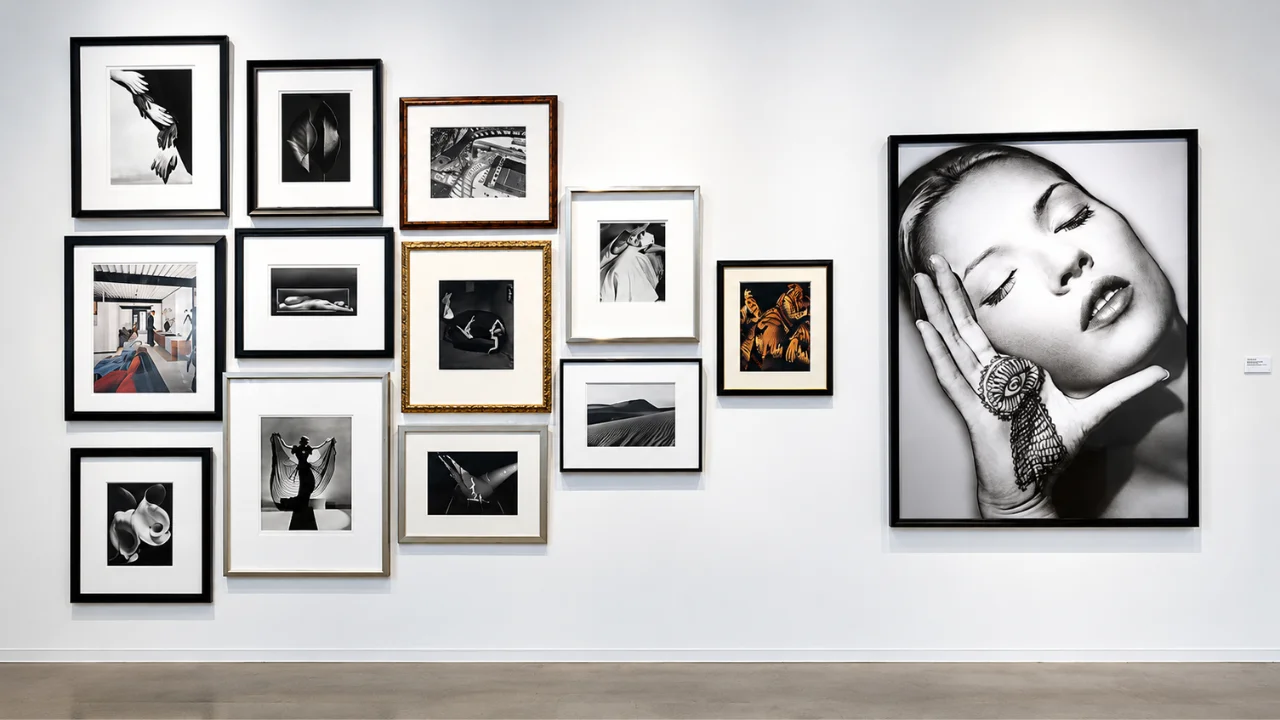
A photography medium label is the line on a wall label that says what the physical artwork is made of. In painting, people write “oil on canvas.” In photography, you write the print process and the material.
Think of it as the answer to one question: “What am I actually looking at?”
The medium is not the camera. It is not the file type. It is the finished object on the wall. A photo shot on a phone and a photo shot on 8×10 film can both end up as an archival pigment print. The label describes the print, not the capture.
There is one exception. Some artists add capture details when the process is part of the story. For example, “Gelatin silver print from a large format negative.” This is optional, but it can add depth.
Why the Medium Label Matters
A medium line may look small. But it does a lot of work.
- It builds trust with buyers. Collectors want to know how long a print will last. “Archival pigment print” tells them the inks are made for longevity.
- It supports pricing. A platinum palladium print takes hours of handwork. Saying so explains the higher price.
- It shows professionalism. Curators notice clear, correct labels. Vague labels look rushed.
- It helps with records. Galleries, insurers, and archives use the medium line in catalogs and condition reports.
- It teaches the audience. Many visitors do not know the difference between a C-print and an inkjet print. Your label is a small lesson.
In short, a clear medium label protects the value of your work, both now and years later.
What Goes on a Photography Exhibition Label
The medium line sits inside a bigger label. Most galleries and museums follow a similar order. Here is the standard artwork label format:
- Artist name (sometimes with birth year and place)
- Title of the work, in italics
- Year the image was made
- Medium, the print process and material
- Dimensions, height by width, in inches and centimeters
- Edition, such as “Edition 2 of 5” or “Ed. 2/5 + 2 AP”
- Credit or price, depending on the venue
Some labels also add a short text about the work. That is called an extended label or wall text.
If the print was made years after the photo was taken, list both dates. For example: “2009, printed 2025.” This matters a lot to collectors. A print made close to the capture date (a vintage print) often has more value than a later one.
Common Photography Medium Terms Explained
Using the right term is the heart of a good label. Below are the most common print processes you will see in galleries.
| Medium term | What it means | Best used when |
|---|---|---|
| Archival pigment print | Inkjet print made with pigment inks on archival paper | Most modern digital fine art prints |
| Inkjet print | General term for any inkjet output | When inks or paper are not archival grade |
| Chromogenic print (C-print) | Color print exposed with light on color photo paper and processed in chemicals | Color prints from a lab using RA-4 paper |
| Gelatin silver print | Classic black and white darkroom print | Prints made in a traditional darkroom |
| Dye sublimation print | Image fused into aluminum or special media using heat | Metal prints and many “aluminum” prints |
| UV print | Ink cured with UV light, often printed straight on rigid board | Prints on acrylic, wood, or Dibond |
| Platinum palladium print | Hand-coated process using platinum and palladium salts | Alternative process work |
| Cyanotype | Blue print made with iron salts and sunlight | Alternative and experimental work |
| Polaroid or instant print | Unique original from instant film | One of a kind instant images |
| Digital C-print | Digital file exposed onto C-type paper by a laser or LED printer | Lab color prints from digital files |
Archival pigment print vs inkjet print
This is the question we hear most. Both come from an inkjet printer. The difference is quality and lifespan. Use “archival pigment print” only when you use pigment inks and acid-free, archival paper. If you are not sure, ask your print lab. Do not use the word “giclée” unless the gallery prefers it. Many curators now see it as a sales word, not a technical one.
Do you name the paper?
You can, and it often helps. “Archival pigment print on Hahnemühle Photo Rag” tells a buyer a lot. If the label is short on space, “on cotton rag paper” works well too.
How to Write the Medium Line: Step by Step
Follow these steps and you will get it right every time.
- Find out the exact print process. Ask your lab or check your printer setup. Was it pigment ink, dye ink, a chemical C-type process, or a darkroom print? Write it down.
- Name the paper or surface. Note the paper type (cotton rag, baryta, matte, lustre) or the surface (aluminum, acrylic, canvas).
- Note the mount or face. If the print is mounted to Dibond, face-mounted to acrylic, or set in a lightbox, include it. Skip the frame unless it is part of the art.
- Put it in the right order. Process first, then material, then mount. Use “on” for the surface and a comma before the mount.
- Cut extra words. No sales language. No “museum quality” or “stunning.” Just facts.
- Match the same style for every label. If one label says “Archival pigment print,” do not write “Pigment inkjet” on the next one. Consistency looks professional.
- Check with the gallery. Some venues have a house style. Send them a sample line before you print all your labels.
Simple formula: [Print process] on [paper or surface], [mount if any]
For example: “Chromogenic print on Fuji Crystal Archive paper, face-mounted to acrylic.”
Photography Exhibition Label Examples
Here are a few label samples you can adapt. Change the names and details to match your work.
Example 1: Modern digital fine art print
Maya Rahman (b. 1990, Dhaka) Monsoon Market, 2024 Archival pigment print on cotton rag paper 24 x 36 in. (61 x 91.4 cm) Edition 1 of 5 + 2 AP
Example 2: Classic black and white
James Holt Harbor at Dawn, 1998, printed 2025 Gelatin silver print 16 x 20 in. (40.6 x 50.8 cm) Edition 3 of 10
Example 3: Large color print for a commercial show
Lena Ortiz Glass Tower No. 4, 2023 Chromogenic print, face-mounted to acrylic 40 x 60 in. (101.6 x 152.4 cm) Edition of 3
Example 4: Metal print
Arif Hossain Salt Flats, 2025 Dye sublimation print on aluminum 30 x 45 in. (76.2 x 114.3 cm) Open edition
Example 5: Alternative process
Noor Kabir Botanical Study III, 2022 Cyanotype on watercolor paper 11 x 14 in. (27.9 x 35.6 cm) Unique
Notice the pattern. Each label stays short. Each medium line answers “how was this made and on what?” Nothing more.
How to Label Digital, AI, and Mixed Media Photography
Photography keeps changing. Labels need to keep up.
Screen-based work
If the work is shown on a screen, the medium is not a print. Write what it is. For example: “Single-channel video, color, sound, 4 min.” Or “Digital photograph displayed on 55 in. OLED screen.”
Composites and heavy editing
Many images are built from several frames. You do not have to list every edit. But if the image is a composite, say so when it matters to the meaning. For example: “Archival pigment print (digital composite).” This is honest, and audiences respect it.
AI-assisted and AI-generated images
This is a growing topic in 2026. Many galleries now ask artists to disclose AI use. A simple, clear line works best:
- “Archival pigment print. Image created with generative AI.”
- “Archival pigment print. Photograph with AI-assisted retouching.”
Check the venue’s rules. Some open calls ban AI images. Others want full disclosure. Being upfront protects your reputation.
Mixed media
If you paint, stitch, or collage on top of a print, list each material. For example: “Gelatin silver print with hand-applied oil paint and thread.” Start with the photo process, then add the other materials in order of how much they appear.
Label Design, Size, and Placement
Good content needs good presentation. Here are simple guidelines most galleries follow.
- Size: Common wall labels are about 4 x 6 inches or 5 x 7 inches. Small shows sometimes use 3 x 5 inch cards.
- Font: Use a clean sans serif or simple serif font. Keep body text around 18 to 24 points so people can read it from a short distance.
- Contrast: Dark text on a light, matte background. Avoid glossy labels. They catch the gallery lights and cause glare.
- Material: Foam board, PVC sheet, or vinyl lettering on the wall all work. Pick one and use it for the whole show.
- Height: Place the label so its center sits about 55 to 60 inches from the floor. That is near eye level for most adults.
- Position: Put it to the right of the artwork, about 4 to 6 inches from the frame edge. Keep the same distance for every piece.
For accessibility, think about wheelchair users and people with low vision. Large text and good contrast help everyone. Some galleries also add QR codes that link to audio or long descriptions.
Common Mistakes to Avoid
We see these errors often. Each one is easy to fix.
- Writing “Photograph” as the medium. It is too vague. Say what kind of print it is.
- Listing the camera. “Shot on Canon R5” is not a medium. Save gear talk for your website or talk.
- Using “giclée” without checking. Many curators prefer “archival pigment print.”
- Calling a print archival when it is not. If you used dye inks or standard paper, do not claim archival quality. It can cause trust and legal issues.
- Mixing styles across labels. Pick one format and stick with it.
- Forgetting the print date. If you reprinted old work, note both dates.
- Missing edition info. Buyers always ask. Put it on the label.
- Typos in names and titles. Proofread twice. Ask a friend to check once more.
- Leaving out composites or AI use. Hiding it can damage your name if it comes out later.
Getting Your Images Exhibition Ready Before You Label
A perfect label means little if the print does not hold up on the wall. Large exhibition prints show every flaw. Dust spots, color shifts, and soft edges that looked fine on screen become obvious at 40 inches wide.
This is where post-production matters. Before your files go to the print lab, they should be cleaned, color corrected, and prepared for the paper you chose. A file made for a glossy C-print may look flat on matte cotton rag. Small tweaks fix that.
At Clipping Area, our team has handled photo retouching and color correction for photographers and brands since 2014. For exhibition work, we help with:
- High-end photo retouching for dust, sensor spots, and skin or product detail
- Color correction so the print matches your vision on the chosen paper
- Background cleanup and compositing done with care and natural results
- Print-ready file prep at the right size and resolution for large formats
A quick tip from our editors: always ask your lab for a small test strip before the full print. It costs little and saves a lot. Once the test looks right, you will know exactly which medium and paper to put on your label.
Frequently Asked Questions
What is the correct way to write the medium for a photograph?
Write the print process, then the material, then the mount. For example: “Archival pigment print on baryta paper, mounted on Dibond.”
Is “digital print” an acceptable medium?
It is better than “photograph,” but still vague. Name the actual process, such as archival pigment print or digital C-print.
What is the difference between a C-print and a pigment print?
A C-print uses light and chemicals on color photo paper. A pigment print uses inkjet pigment inks sprayed onto paper. Both can look great. They differ in surface, color feel, and how they age.
Should I include the frame in the medium line?
Usually no. Only include it if the frame is part of the artwork’s concept.
Do I need to mention editing or retouching?
Standard retouching like dust removal and color correction does not need a mention. Composites and AI-generated content should be disclosed.
How should I write edition numbers?
Use “Edition 2 of 5” or “Ed. 2/5.” Add artist proofs as “+ 2 AP.” For one-off works, write “Unique.”
Should I list dimensions in inches or centimeters?
Both is safest for international shows. Height comes first, then width. Example: “20 x 30 in. (50.8 x 76.2 cm).”
Can I use the same label for online sales?
Yes. Keep the medium line the same on your website, catalog, and certificate of authenticity. Consistency builds trust with collectors.
Final Thoughts
Knowing how to label photography medium for exhibitions is a small skill with a big payoff. A clear medium line tells the truth about your work. It helps buyers trust you, helps curators present you, and helps your prints keep their value over time.
Remember the simple formula: print process, then paper or surface, then mount. Keep every label short, honest, and consistent.
And before you print, make sure your files are ready for the wall. If you want your exhibition images retouched, color corrected, and print ready, the team at Clipping Area is happy to help. Send us a few sample images and see the difference professional post-production makes.