You have just finished a product shoot. The images look good, but the backgrounds are messy, uneven, or simply wrong for your store. You know the backgrounds need to go, so you start looking for an editing service and immediately hit two terms: clipping path and image masking. They sound similar. Both promise clean background removal. So which one do you order?
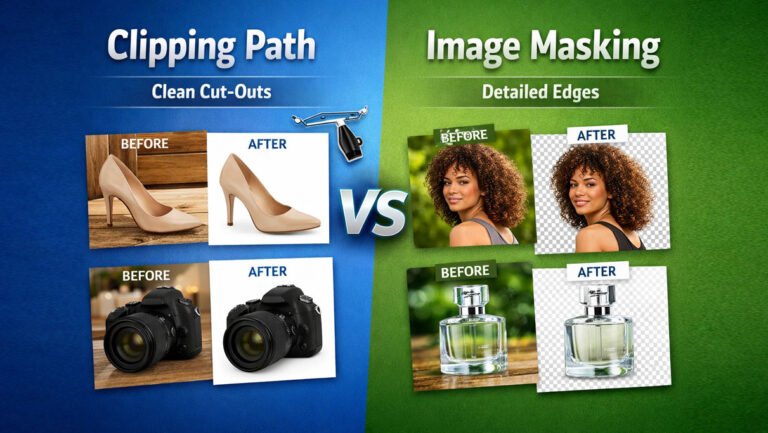
That is the real question behind Clipping Path vs Image Masking. Both techniques isolate a subject from its background, but they are built for very different kinds of edges. One excels at crisp, solid outlines. The other is designed for hair, fur, transparency, and soft details that a hard line cannot capture.
Ordering the wrong one wastes money, time, or quality. This guide explains how each works, where each belongs, and how to decide which photo editing service you actually need.
What Is a Clipping Path?
A clipping path is a closed vector outline drawn around a subject so it can be separated from its background. In Photoshop, editors create it with the Pen Tool by placing anchor points along the edge of the object and adjusting the curves between them until the path follows the shape exactly.
Everything inside the path is kept. Everything outside is removed or replaced. Because the path is vector-based, it is mathematically defined rather than built from pixels, which means the edge stays smooth and sharp at any size.
Here is how a skilled editor builds a Photoshop clipping path in practice:
- The image is zoomed in (often 200% to 400%) so the edge can be followed precisely.
- Anchor points are placed at every change in direction.
- Bezier handles are pulled to shape the curves so they hug the outline without cutting into the product or leaving background fringe.
- The path is closed, saved, and converted to a selection or mask for background removal.
The key idea is that a clipping path produces a hard edge. That is exactly what you want when the object itself has a clean, defined outline. A sneaker sole, the rim of a ceramic bowl, the corner of a laptop, or the curve of a perfume bottle cap all have edges that a vector path can trace perfectly.
Clipping paths are especially effective for:
- Shoes and sneakers
- Handbags and leather goods
- Furniture
- Electronics and gadgets
- Kitchen and home appliances
- Bottles and cosmetic containers
- Watches (the case, strap, and dial outline)
- Simple clothing with smooth edges
- Tools, hardware, and other hard-surface products
Simple products might need only a basic path. Items with holes, gaps, or many separate parts (a chair with open slats, a bag with a handle, a bicycle) require a complex clipping path with inner paths. When different parts of a product need to be edited separately, for example recoloring the laces of a shoe without touching the upper, editors create a multi-path clipping path, where each component gets its own named path.
What Is Image Masking?
Image masking is a pixel-based technique for isolating subjects that do not have clean, solid edges. Instead of drawing a single hard outline, the editor controls the visibility of each pixel, which allows partial transparency and soft transitions.
The foundation is the layer mask. A layer mask is a grayscale map attached to a layer:
- White areas are fully visible.
- Black areas are fully hidden.
- Gray areas are partially visible.
That gray range is what makes masking so powerful. A single strand of hair, the wispy tip of a feather, or the frosted edge of a glass is not fully “in” or “out” of the image. It sits somewhere in between. A clipping path can only say yes or no. A mask can say “60% visible.”
Common Photoshop masking methods include:
- Layer masking: painting or refining visibility directly on a mask.
- Channel masking: using the contrast in the red, green, or blue channel to separate fine detail (like hair against a sky) from the background.
- Alpha masking: building an alpha channel that stores transparency information, often used for semi-transparent or complex subjects.
- Refine Edge / Select and Mask: tools that help capture strands and soft borders, usually followed by manual cleanup.
Image masking is the right approach for:
- Human hair and flyaways
- Animal fur
- Feathers
- Fine fibers, wool, and fuzzy fabrics
- Transparent and semi-transparent objects
- Smoke, veils, lace, and mesh
- Any edge that is soft, blurred, or irregular
Masking gives editors more flexibility because the result can be adjusted later without redrawing anything. The tradeoff is that high-quality masking takes judgment. Automatic selections alone often leave halos, color fringing, or chopped strands, so professional image masking photo editing always involves careful manual refinement.
Clipping Path vs Image Masking: What Is the Difference?
| Feature | Clipping Path | Image Masking |
|---|---|---|
| Basic technique | Vector outline drawn with the Pen Tool | Pixel-based visibility control using masks and channels |
| Best for | Objects with solid, defined outlines | Subjects with soft, fine, or irregular edges |
| Edge type | Hard, crisp | Soft, feathered, partially transparent |
| Hard edges | Excellent | Possible but usually unnecessary |
| Hair | Poor (strands get cut off) | Excellent |
| Fur | Poor | Excellent |
| Transparency | Cannot represent partial transparency | Handles semi-transparent areas well |
| Fine details | Limited to what an outline can trace | Preserves strands, fibers, and wisps |
| Precision | Extremely precise on geometric shapes | Precise on organic and fine detail |
| Flexibility | Edge is fixed once drawn | Easy to refine and adjust later |
| Editing time | Depends on shape complexity and number of points | Depends on amount of fine detail and contrast with background |
| Complexity | Simple to complex (inner paths, multi-path) | Moderate to high, needs more judgment |
| Common uses | Products, furniture, electronics, cars, footwear | Models, pets, fashion, glassware, feathers, fabrics |
| Cost factors | Number of anchor points, curves, holes, and parts | Amount of hair or fur, transparency, background contrast |
The simplest way to understand the difference between clipping path and image masking is this: a clipping path defines a boundary, while a mask defines visibility.
A clipping path is ideal when there is a real, sharp boundary between the object and the background. A mask is ideal when that boundary is blurry, broken, or made of thousands of tiny details.
Neither is “better” in general. A mask applied to a smartphone will not look better than a clean path, and it often looks worse because the edge can turn slightly soft. A clipping path applied to a model’s hair will look obviously cut out. Quality comes from matching the technique to the edge.
Clipping Path vs Image Masking: Which One Should You Choose?
The direct answer: choose the technique based on the image, not on the service name. Look at the edges of your subject, and the right method becomes obvious.
Use a clipping path when:
- Edges are hard and clearly visible
- The product shape is well defined
- The product has solid, opaque edges
- The background is relatively simple
- Precise outlines are required for catalogs or print
- The shape can be traced accurately with the Pen Tool
Use image masking when:
- Hair is visible, especially loose strands or flyaways
- Fur is present
- Feathers are part of the subject
- Fine fibers need to be preserved (knitwear, mohair, faux fur)
- Edges are soft or out of focus
- Transparency or translucency is involved
- The subject has complex, irregular detail
Use both when:
- The image contains both hard and soft edges
- A product has a solid body but delicate details (a hat with a feather, a boot with fur lining)
- A model is wearing clothing with clean lines but has loose hair
- Different parts of the product need different selection methods
This combined approach is extremely common in professional work. Many “clipping path and image masking” orders are really one image where the editor uses a path for the crisp parts and a mask for the soft parts, then merges them into a single clean result.
When Should You Use a Clipping Path?
Ecommerce Product Photography
Most ecommerce catalogs are dominated by hard-surface products, which is why the clipping path service remains the backbone of product photo editing. Shoes, bags, electronics, furniture, appliances, simple clothing, and home products all have outlines that a path traces cleanly.
A good clipping path for ecommerce product photography also handles the details people forget: the gap between a handbag strap and its body, the holes in a sneaker’s eyelets, the space between chair legs. These inner areas must be removed too, otherwise the old background shows through and the image looks unfinished.
Jewelry
Clipping paths work very well for the metal structure of jewelry: ring bands, pendant outlines, bracelet links, and watch cases. Metal has crisp edges, and a path keeps them sharp.
However, jewelry often needs more than a path alone. Fine chains, clear gemstones, and soft reflections may call for masking or additional retouching. More on this in the jewelry section below.
Automotive Photography
Cars, motorcycles, and other vehicles have long, smooth, defined curves, which makes them excellent candidates for a clipping path. Editors trace the body, then add inner paths for windows (if the background should show through), wheel spokes, and mirrors. Clipping paths for cars are common among dealerships and marketplaces that want every vehicle placed on a consistent background.
Fashion Products
Clothing with clean edges, such as a pressed shirt, structured jacket, jeans, or a flat-lay T-shirt, can often be handled entirely with a clipping path for fashion. The path follows the seams, collar, and hem precisely. The moment fabric turns fuzzy, frayed, or sheer, masking should take over for those areas.
When Should You Use Image Masking?
Hair
Hair is the classic case for masking. A single head of hair contains thousands of strands, many of them thinner than a pixel and partly transparent against the background. A clipping path forces an edge where none really exists, so the result looks helmet-like and unnatural. Image masking for hair keeps individual strands and flyaways while removing the background color from between them.
Fur
Image masking for fur follows the same logic. Pet products, faux fur coats, plush toys, and fur-trimmed garments all have soft, irregular edges. Masking preserves the texture so the subject still looks soft and real after background removal.
Feathers
Feathers have delicate barbs that fan out and fade into transparency at the tips. Cutting them with a path destroys that detail. Masking lets the editor keep the fine structure intact, which matters for fashion accessories, costumes, decor, and fishing products.
Transparent Products
Glass, transparent bottles, clear plastic, packaging film, and other clear objects are not solid from edge to edge. Light passes through them, and the background is visible inside the product. A good edit typically uses a path for the outer outline, then masks to control transparency so the product looks natural on its new background instead of carrying traces of the old one.
Complex Clothing
Some garments contain details that a path simply cannot represent:
- Fine fibers on wool, mohair, or angora
- Loose threads and fringe
- Frayed denim hems
- Sheer fabrics like chiffon and tulle
- Lace and mesh with open patterns
- A model’s hair falling across the garment
In these cases, masking protects the texture that makes the garment look authentic.
Clipping Path vs Image Masking for Ecommerce Product Images
Whether you sell on Amazon, run a Shopify store, manage a WooCommerce site, or supply online marketplaces and printed product catalogs, the goals are usually the same:
- Clean backgrounds that meet platform requirements, such as a pure white background for main listing images
- Accurate product isolation with no leftover background, halos, or chopped edges
- Consistent images across an entire catalog, so products look like they belong together
- Professional presentation that represents the product honestly
For most ecommerce product images, the clipping path is the default because most products are solid. Image masking for ecommerce becomes necessary when the catalog includes apparel with models, fuzzy textiles, pet products, beauty products with transparent packaging, or anything with fine detail.
The best way to think about it: clipping path or masking for ecommerce products depends on the product category, not the platform. Amazon does not require a specific technique. It requires a clean result. The technique is simply how the editor achieves that result reliably.
It is also worth being realistic. Neither technique automatically improves your search rankings, sales, or conversion rates. What editing does is remove visual distractions and present your product clearly. That supports a professional store, but it works alongside good photography, accurate descriptions, and fair pricing.
Clipping Path vs Image Masking for Apparel
Apparel is where the choice gets the most interesting, because one garment photo often contains several edge types at once.
T-shirts and shirts: Usually clean edges, so a clipping path works well for flat-lays and ghost mannequin shots. Watch for loose threads at hems and cuffs.
Dresses: Structured dresses suit a path. Flowing, sheer, or layered dresses often need masking along the hem and any transparent fabric.
Jackets: Leather and denim jackets have crisp outlines. Puffer jackets with fur-trimmed hoods need a path for the body and a mask for the trim.
Sweaters: Knitwear often has a fuzzy halo of fibers, especially wool and mohair. Masking keeps that softness, which is part of how shoppers judge the material.
Denim: Mostly path-friendly, except for distressed or frayed areas where masking preserves the raw edge.
Sportswear: Technical fabrics tend to have clean edges. Mesh panels may need masking if the background shows through.
Fashion accessories: Belts, sunglasses, and structured bags suit clipping paths. Scarves, feather accessories, and fringe bags need masking.
Ghost mannequin images
Ghost mannequin editing combines multiple photos (the outside of the garment and the inside of the neck or back) into one hollow, 3D-looking image. The mannequin is removed, usually with clipping paths, and the pieces are aligned and blended. If the fabric has soft fibers, masking is used on those edges too.
Model photography
On-model shots almost always need both techniques. The clothing may be traced with a path, while the model’s hair is handled with image masking. Wrinkles and folds are kept in place, because removing them would misrepresent how the garment actually looks.
This is the clearest example of why the Clipping Path vs Image Masking debate is often the wrong framing. Different parts of one image may require different editing techniques, and a skilled editor chooses per edge, not per order.
Clipping Path vs Image Masking for Jewelry
Jewelry is small, reflective, and detailed, which makes it one of the most demanding categories in product photo editing.
Rings: The band and setting have hard metal edges, ideal for a clipping path. The inner opening of the ring needs its own inner path.
Necklaces: Solid pendants suit a path. Fine chains are tricky because every link has gaps, and a thin chain can be only a few pixels wide. Editors often use detailed paths for thicker chains and masking for very fine ones.
Bracelets: Link bracelets need a complex clipping path with many inner paths. Beaded or thread bracelets may need masking for loose ends.
Earrings: Small and often paired, so precision matters. Hooks and wires are thin enough that masking can help keep them intact.
Watches: The case and strap are path-friendly. The crystal (glass) may need masking or retouching to control reflections and keep it looking transparent.
Common jewelry challenges
- Fine chains: Easily broken or thickened by rough selections.
- Small stones: Clear stones like diamonds show the background through them, so transparency must be handled carefully.
- Metal edges: Need to stay crisp and clean.
- Reflections: Polished metal reflects the studio, which may need retouching after isolation.
- Transparency: Glass, crystal, and clear stones need masking to look natural.
- Tiny details: Prongs, engraving, and filigree must not be lost.
- Shadows: Natural shadows may be preserved, or a realistic drop shadow added so the piece does not appear to float.
This is why some jewelry images require a combination of clipping path, masking, and retouching. A path alone gives clean metal but may leave dull stones or a flat look. The best jewelry edits treat isolation as the first step, not the whole job.
Clipping Path vs Masking Cost: What Affects the Price?
Pricing for both services is usually per image, and it is driven by time and difficulty rather than by the service label.
Clipping path cost depends on:
- Number of anchor points and curves
- Number of holes or inner paths
- Number of separate parts (multi-path work)
- Image resolution
- Whether extra work is included, such as shadows or color correction
Image masking cost depends on:
- Amount of hair, fur, or fine detail
- Contrast between the subject and background (low contrast takes longer)
- Level of transparency involved
- How natural the final edge must look
- Whether a path is also required for the solid parts
As a general guide, simple clipping paths are the most affordable tier, complex and multi-path work costs more, and detailed masking for hair, fur, or glass usually sits at the higher end. Most providers group images into complexity levels and quote per level, with discounts for bulk orders. The best way to get an accurate number is to send a few sample images and ask for a quote before committing to a full batch.
Should You Outsource Clipping Path or Image Masking?
If you only edit a handful of simple images, doing it yourself in Photoshop is possible. But once volume grows or edges get complicated, outsourcing usually makes more sense.
Outsourcing is worth considering when:
- You have dozens or hundreds of images per shoot
- You need consistent results across a whole catalog
- Your images include hair, fur, glass, or fine jewelry
- Your team’s time is better spent on photography, sales, or operations
- You need fast turnaround for launches or seasonal updates
When choosing a professional clipping path service or image masking service, check:
- Sample edits on images similar to yours, especially hair and transparent products
- Whether they hand-draw paths or rely only on automatic tools
- Whether they combine techniques within one image when needed
- File delivery options (PSD with paths, PNG with transparency, JPG on white)
- Revision policy and turnaround times
- A free trial on a few images before a large order
A reliable provider will tell you which technique each image needs rather than just selling you the most expensive one.
Common Mistakes to Avoid
- Ordering clipping paths for hair. The result looks cut out and unnatural.
- Masking hard-edged products unnecessarily. It can soften edges that should be crisp and usually costs more.
- Forgetting inner areas. Background left inside handles, straps, or chair legs is an instant giveaway.
- Ignoring shadows. A product with no shadow can look like it is floating.
- Accepting halos. A thin line of the old background color around the edge is a sign of rushed work.
- Not sending instructions. Tell the editor your background color, output size, file format, and whether to keep shadows.
Frequently Asked Questions
What is the difference between clipping path and image masking?
A clipping path is a vector outline that creates hard edges around solid objects. Image masking controls pixel visibility, which allows soft edges and partial transparency for hair, fur, and fine detail.
Is clipping path better than image masking?
No. Each is better for different edges. Clipping paths are best for solid products; masking is best for soft or complex subjects.
Which is better for hair and fur?
Image masking. It preserves individual strands and soft texture that a path would cut off.
Which is better for clothing?
It depends on the garment. Clean edges suit a clipping path, while knitwear, fringe, sheer fabric, and on-model hair need masking. Many apparel images use both.
Which is better for jewelry?
Clipping paths handle metal edges well, but fine chains, clear stones, and reflections often need masking and retouching as well.
Which is better for ecommerce products?
For most hard-surface products, a clipping path. For apparel, pet products, beauty packaging, and anything transparent or fuzzy, masking or a combination.
Can clipping path and image masking be used together?
Yes, and they often are. Editors use paths for solid parts and masks for soft parts within the same image.
How much does clipping path or image masking cost?
Price depends on complexity. Simple paths are the cheapest, complex paths cost more, and detailed masking typically costs the most. Ask for a quote based on sample images.
Conclusion
The Clipping Path vs Image Masking question does not have one winner. It has a right answer for each image. If your subject has solid, defined edges, a clipping path delivers crisp, precise results. If it has hair, fur, feathers, fibers, or transparency, image masking preserves the detail that makes it look real. And when an image contains both, the best result comes from using both.
Before you order, look closely at the edges of your subject. That single step will tell you which service you need and help you avoid paying for the wrong one.
If you want expert help deciding, Clipping Area has been providing professional clipping path, image masking, and background removal services for ecommerce brands, photographers, and agencies since 2014. Send a few sample images, and our editors will recommend the right technique for each one.