Your clothing photos can make or break an Amazon listing. A great shirt with a bad photo gets skipped. A photo that breaks Amazon’s rules can get suppressed before a shopper ever sees it. That is why understanding Amazon Ghost Mannequin Image Rules matters before you upload a single apparel image.
Ghost mannequin images (also called invisible mannequin images) show clothing in a natural 3D shape without a visible mannequin or model. They look clean and professional. But the technique alone does not make an image Amazon-ready. The final file still has to meet Amazon’s product image requirements for background, framing, size, quality, and category.
This guide explains what ghost mannequin images are, how Amazon’s image rules apply to them, how to create compliant apparel images step by step, which mistakes to avoid, and when professional editing makes sense.
Important note: Amazon’s image requirements can vary by marketplace, category, product type, and image position (main image vs. additional images). Amazon also updates its guidance over time. Always check the latest Amazon Seller Central Product Image Guide and the style guide for your specific category before uploading.
What Is a Ghost Mannequin Image?
A ghost mannequin image is a clothing photo where the garment looks like it is worn by an invisible body. The mannequin is removed during editing, so shoppers see the garment’s real shape, fit, and structure with nothing distracting around it.
How the Invisible Mannequin Effect Works
The process is simple in concept:
- The garment is placed on a mannequin and photographed.
- A second photo is taken of the inside of the garment, usually the inner neck, back collar, or label area.
- An editor removes the mannequin from the main photo.
- The inside photo is blended into the empty neck opening.
- The result looks like a hollow, floating garment with a natural 3D shape.
Why the Neck Area Is Edited Separately
When you remove the mannequin, the neck opening becomes empty. If it stays empty, the garment looks flat and unfinished. By shooting the inside back of the collar separately and placing it into the opening, the editor creates a realistic interior. This “neck joint” is the most important detail in ghost mannequin editing.
Combining Front and Back Pieces
Some garments need more than two shots. Jackets, hoodies, and dresses may require separate photos for the front, the inside back, and sometimes the sleeves. The editor combines these pieces into one seamless image.
Traditional Mannequin vs. Ghost Mannequin Photography
| Feature | Traditional Mannequin | Ghost Mannequin |
|---|---|---|
| Mannequin visible | Yes | No |
| Garment shape | 3D | 3D |
| Focus on product | Shared with mannequin | Product only |
| Editing needed | Light | Moderate to advanced |
| Amazon main image risk | High in categories that prohibit mannequins | Lower, if no mannequin parts remain |
Why Ghost Mannequin Images Are Popular in Fashion Ecommerce
- They show fit and shape better than flat lay photos
- They keep attention on the product
- They look consistent across large catalogs
- They cost less than hiring models for every item
- They work well on white backgrounds
Are Ghost Mannequin Images Allowed on Amazon?
Short answer: Amazon does not ban the ghost mannequin editing technique itself. What matters is the final image. If the finished image shows no mannequin and meets all other requirements for your category and image position, the technique is not the problem.
There is an important difference between:
- Creating a ghost mannequin effect during editing. The mannequin is used only as a shooting tool and is fully removed.
- Showing a visible mannequin in the final image. Any leftover mannequin part (neck stand, plastic edge, base, pole) can cause problems where Amazon prohibits mannequins.
Amazon’s image guidance has historically restricted visible mannequins in main images for many apparel and accessory categories. Some clothing categories also have specific main image styles. For example, Amazon’s clothing guidance has commonly asked for adult apparel main images to be shown on a model, and for kids’ and baby apparel to be shown off-model (flat). Because these rules are category-specific and can change, check the current style guide for your exact category before choosing ghost mannequin for your main image.
Ghost mannequin images are also widely used as additional (secondary) images, where Amazon’s rules are generally more flexible.
Amazon Ghost Mannequin Image Rules for 2026
Below are the core requirements that apply to Amazon product images, plus how they affect ghost mannequin editing. Rules come from Amazon’s product image guidance. Editing tips are professional best practice.
Pure White Background
Amazon requires a pure white background for main images, defined as RGB 255, 255, 255.
White keeps search results clean and consistent, and it helps shoppers compare products easily.
What to watch in ghost mannequin editing:
- Background cleanup: Studio backgrounds often photograph as light gray. They must be corrected to true white.
- Gray or colored edges: Leftover pixels from the original backdrop show up as dirty outlines.
- Halos: A thin light or dark ring around the garment is a sign of rough masking. It looks unprofessional on white.
Tip: Use the eyedropper or info panel in your editing software to confirm the background reads exactly 255, 255, 255 in several spots, not just one.
Product Must Be Clearly Visible
Amazon requires that the product be shown clearly and accurately. In apparel, that means preserving every detail a shopper uses to make a decision:
- Shape and silhouette
- True color
- Fabric texture
- Stitching and seams
- Sleeves and cuffs
- Collar and neckline
- Buttons and zippers
- Pockets
- Prints and patterns
If editing hides or blurs any of these, the image may mislead customers and lead to returns.
Product Fill and Framing
Amazon’s guidance states that the product should fill 85% or more of the image frame in the main image.
This creates two opposite risks:
- Too much empty space: The garment looks tiny in search results.
- Accidental cropping: Sleeves, hems, or collars get cut off at the edge.
Amazon requires the full product to be visible in the main image. Aim for a tight frame with a small, even margin around the garment.
Image Resolution and Quality
Amazon’s guidance includes these size points:
- Images should be at least 1,000 pixels on the longest side to enable zoom
- Amazon recommends larger images (commonly 1,600 pixels or more on the longest side) for better zoom quality
- Very small images (under Amazon’s minimum) can be rejected
- Accepted file formats include JPEG (preferred), TIFF, PNG, and non-animated GIF
Quality problems to avoid:
- Blur: Shoppers cannot see fabric details
- Pixelation: Caused by upscaling small images
- Jagged edges: Caused by rough clipping
- Heavy compression: Creates blocky artifacts in dark or textured fabrics
Amazon expects professional-quality photography. Phone snapshots under poor lighting rarely meet that standard.
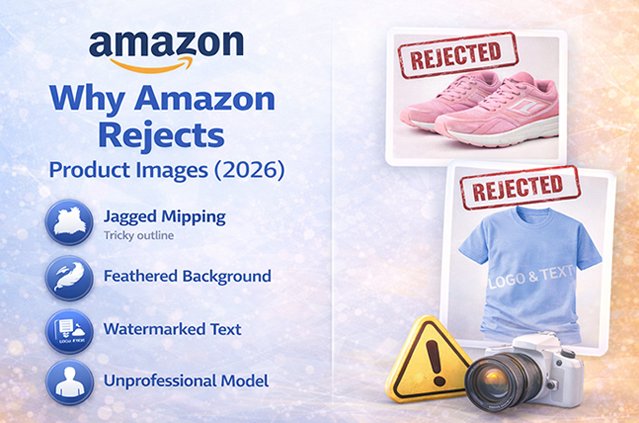
Avoid Text, Logos, Watermarks, and Promotional Graphics
Amazon’s main image rules prohibit extra content added to the image, such as:
- Text or captions
- Brand logos added as overlays (a logo printed on the garment itself is part of the product)
- Watermarks
- Badges like “Best Seller” or “Sale”
- Borders, color blocks, or graphic elements
Keep the main image to the product only. Infographics and text belong in additional images, where allowed.
Avoid Unnecessary Props
Amazon’s guidance restricts props and accessories that are not included with the product in the main image. A belt, bag, or hanger that is not part of the purchase can confuse shoppers about what they will receive. Show only what the customer gets.
Avoid Visible Mannequin Parts
This is the rule most directly tied to ghost mannequin work. Even small leftovers can make an image look unprofessional or conflict with Amazon’s mannequin restrictions:
- Plastic neck or shoulder edges
- Skin-colored mannequin areas showing through armholes
- Mannequin base, pole, or stand
- Clips, pins, or hooks used to shape the garment
- Tags or support tape
A finished ghost mannequin image should show only fabric and product details.
Avoid Unnatural Clothing Distortion
Amazon requires the image to accurately represent the product. Over-editing breaks that rule in quiet ways:
- Warping the waist to look slimmer
- Stretching the length of a dress
- Reshaping shoulders unrealistically
- Smoothing away real texture like knit ribbing
If the customer receives something that looks different from the photo, you risk returns, bad reviews, and possible listing issues.
Amazon Clothing Image Requirements vs. Ghost Mannequin Editing
These two things are related but not the same.
| Amazon Image Requirements | Ghost Mannequin Editing | |
|---|---|---|
| What it is | Rules set by Amazon | A photo editing technique |
| Who defines it | Amazon | Photographers and editors |
| Purpose | Consistent, accurate, trustworthy listings | Clean 3D garment presentation |
| Examples | White background, 85% fill, no text, no visible mannequin in restricted cases | Mannequin removal, neck joint, edge cleanup |
| Does it guarantee approval? | Following it is required | No, editing alone does not ensure compliance |
Key point: Ghost mannequin editing is a tool. Amazon’s requirements are the standard. A beautifully edited image can still fail if the background is off-white, the product is cropped, or your category requires a model for the main image.
How to Create an Amazon-Ready Ghost Mannequin Image
Follow this workflow from shoot to upload.
1. Photograph the garment correctly. Use a mannequin that fits the garment size. Steam or iron the item first. Use even, soft lighting.
2. Capture the front of the product. Shoot straight on, centered, with the camera at mid-garment height to avoid distortion.
3. Capture the inside collar or neck area. Turn the garment inside out or remove the mannequin’s neck piece and photograph the inner back collar with the same lighting.
4. Capture important product details. Shoot close-ups of fabric, buttons, zippers, labels, and prints for additional images.
5. Remove the mannequin. Use a precise clipping path or mask to separate the garment from the mannequin and background.
6. Create the invisible mannequin effect. Clean up the areas where the mannequin touched the garment so no plastic or support remains.
7. Reconstruct the inner neckline. Blend the inside collar shot into the neck opening. Match perspective, lighting, and color.
8. Clean edges. Remove halos, fringes, and stray pixels. Keep edges smooth but natural.
9. Correct the background. Set the background to pure white RGB 255, 255, 255.
10. Adjust color carefully. Match the image to the real garment under neutral light. Do not oversaturate.
11. Preserve natural fabric texture. Remove lint and dust, but keep weave, knit, and grain visible.
12. Check shadows. If you add a shadow, keep it soft and subtle. Remove harsh or floating shadows.
13. Check product proportions. Compare the edited image to the actual garment. Sleeves, length, and width should match reality.
14. Check cropping. Confirm nothing is cut off and the garment fills about 85% of the frame.
15. Check image dimensions. Export at 1,000 pixels or more on the longest side (larger is better for zoom).
16. Perform a final Amazon compliance review. Check background, text, props, mannequin traces, file format, and your category’s style guide.
Common Ghost Mannequin Editing Mistakes Amazon Sellers Make
1. Leaving mannequin parts visible. Small plastic edges near the neck or armholes are easy to miss and can break mannequin rules.
2. Making the neck opening unrealistic. A flat, mismatched, or empty neckline instantly looks fake and lowers trust.
3. Removing important garment details. Aggressive cleanup can erase buttons, stitching, or tags that shoppers want to see.
4. Changing the actual product color. Wrong color is one of the biggest causes of “not as described” returns.
5. Creating jagged edges. Rough clipping looks cheap, especially when shoppers zoom in.
6. Leaving a gray background. Near-white (like 245, 245, 245) is not pure white. It looks dull and does not meet the main image standard.
7. Adding unnecessary shadows. Heavy drop shadows make garments look pasted on.
8. Excessive smoothing. Overly smooth fabric looks plastic and hides texture.
9. Over-sharpening. Creates harsh outlines and noise, especially on patterns.
10. Cropping sleeves. Cut-off sleeves mean the full product is not shown.
11. Cropping the bottom of the garment. Hems matter for length and style decisions.
12. Incorrect proportions. A stretched or squeezed garment misleads buyers about fit.
13. Making clothing appear thinner or thicker. Warping shape to “look better” creates mismatched expectations.
14. Using low-resolution images. Blocks zoom and makes the product look low quality.
15. Adding text to the main image. Amazon prohibits text and graphics on main images.
16. Inconsistent editing styles across a catalog. Different sizes, angles, and white tones make a store look disorganized.
Ghost Mannequin vs. Flat Lay vs. Model vs. Hanger Photography
No single method is best for every product. Here is a quick comparison.
| Factor | Ghost Mannequin | Flat Lay | Model | Hanger |
|---|---|---|---|---|
| Appearance | Clean, 3D, floating | Flat, top-down | Real person wearing item | Garment hanging |
| Clothing shape | Shows fit and structure | Limited shape | Shows fit on a body | Limited, may sag |
| Brand presentation | Professional, minimal | Casual, simple | Lifestyle, aspirational | Basic |
| Editing needs | Moderate to advanced | Low to moderate | Moderate (retouching) | Moderate (hanger removal) |
| Ecommerce usability | High for catalogs | High for simple items | High for engagement | Lower |
| Amazon suitability | Good, depends on category and image slot | Common for kids and baby apparel | Commonly required for adult apparel main images | Hanger may count as a prop, check rules |
| Best use case | Tops, jackets, dresses, catalogs | T-shirts, kids’ clothing, accessories | Fashion brands, fit-focused items | Low-budget listings, secondary images |
Many successful sellers combine methods: a category-compliant main image plus ghost mannequin, detail, and lifestyle shots in additional images.
How to Prepare Ghost Mannequin Images for Amazon
Before Photography
- Garment preparation: Remove tags that should not show, lint, threads, and dust.
- Wrinkle removal: Steam every item. Wrinkles are harder to fix in editing.
- Lighting: Use soft, even lighting to avoid hot spots and deep shadows.
- Camera setup: Use a tripod, fixed focal length, and consistent settings.
- Product positioning: Center the garment on a properly sized mannequin.
During Photography
- Consistent angles: Keep camera height and distance the same for every item.
- Proper framing: Leave a small margin so nothing gets cropped.
- Accurate color: Use a gray card or color checker for white balance.
- Multiple shots: Capture front, back, inside neck, and detail images.
During Editing
- Background removal: Clean clipping path or mask.
- Mannequin removal: Remove every visible trace.
- Neck reconstruction: Blend the inner collar naturally.
- Edge cleanup: Remove halos and fringing.
- Color correction: Match the real product.
- Shadow control: Subtle or none.
Before Uploading
- Dimensions: 1,000 px or more on the longest side.
- File format: JPEG preferred, or TIFF, PNG, non-animated GIF.
- Background: Pure white RGB 255, 255, 255 for the main image.
- Product visibility: All key details visible.
- Cropping: Full product in frame, filling about 85%.
- Image quality: Sharp, no pixelation or artifacts.
- Amazon compliance: Check your category style guide and image slot rules.
Amazon Ghost Mannequin Image Checklist
Scan this list before every upload:
- ☐ Background is pure white (RGB 255, 255, 255)
- ☐ No gray patches or uneven white areas
- ☐ No halos or colored fringes around edges
- ☐ No mannequin parts visible (neck, shoulders, base, pole)
- ☐ No pins, clips, or support tape visible
- ☐ Inner neckline looks natural and matches lighting
- ☐ Garment fills about 85% of the frame
- ☐ No sleeves, hems, or collars cropped
- ☐ Colors match the real product
- ☐ Fabric texture is preserved
- ☐ Buttons, zippers, pockets, and stitching are visible
- ☐ Proportions match the real garment
- ☐ No text, logos overlays, badges, or watermarks on the main image
- ☐ No props that are not included with the product
- ☐ Image is 1,000 px or more on the longest side
- ☐ File is JPEG, TIFF, PNG, or non-animated GIF
- ☐ No blur, pixelation, or compression artifacts
- ☐ Shadows are subtle or removed
- ☐ Style matches the rest of your catalog
- ☐ Category style guide and image slot rules checked
Why Professional Ghost Mannequin Photo Editing Matters
Ghost mannequin editing looks simple but takes skill and time, especially at scale. Professional editing helps solve common business problems:
- Large clothing catalogs: Hundreds of SKUs, colors, and sizes need the same treatment.
- Bulk image editing: New collections and seasonal drops need fast processing.
- Consistent presentation: Every image should share the same framing, white tone, and style.
- Faster production: Your team can focus on sourcing, listing, and marketing.
- Cleaner edges: Precise clipping holds up under Amazon zoom.
- Better garment shape: Skilled neck joints and symmetry make garments look natural.
- Consistent white backgrounds: Every image checked for true white.
- Professional ecommerce appearance: A polished store builds shopper trust.
- Reduced manual workload: No more late nights in Photoshop.
Professional editing improves image quality and consistency. It does not guarantee rankings or sales, since those depend on many factors like pricing, reviews, keywords, and inventory. But clean, accurate, compliant images remove one major obstacle between your product and the buyer.
Professional Amazon Ghost Mannequin Photo Editing by Clipping Area
Clipping Area is a Post-Production Photo Retouching Agency that supports apparel brands, fashion labels, photographers, and ecommerce sellers with professional image post-production.
For Amazon clothing sellers, Clipping Area can help with:
- Ghost mannequin photo editing: Mannequin removal, neck joint reconstruction, and natural 3D garment shape
- Clothing photo editing: Wrinkle cleanup, lint removal, and shape correction without distorting the product
- Background removal and clipping path: Precise product cutouts for clean edges
- Background cleanup: Pure white backgrounds prepared for Amazon main images
- Image masking: Detailed edges for fur, lace, mesh, and fine fabric
- Color correction: Accurate product color across variants
- Apparel retouching: Natural texture with a polished finish
- Ecommerce product image editing: Consistent sizing, framing, and export settings
- Bulk image editing: Support for large catalogs and seasonal collections
- Amazon product image preparation: Images edited with Amazon’s white background, framing, and size guidance in mind
You still need to confirm your category’s specific rules (for example, whether your main image must be on-model), but having images prepared to a consistent, professional standard makes that final step much easier.
Want to see the quality before you commit?
👉 Get a Free Sample | Get a Free Quote
Frequently Asked Questions
What is an Amazon ghost mannequin image?
It is an apparel product image where the mannequin has been removed during editing, so the garment appears in a natural 3D shape on a white background with no visible support.
Are ghost mannequin images allowed on Amazon?
The technique is not the issue. The final image must meet Amazon’s requirements for your category and image position. If no mannequin parts remain and the image meets all other rules, it can work, but some categories require specific main image styles such as on-model.
Can I use a mannequin for Amazon clothing photos?
You can use a mannequin as a shooting tool. However, Amazon restricts visible mannequins in main images for many apparel and accessory categories, so the mannequin should usually be removed in editing.
What background should an Amazon main image have?
A pure white background, RGB 255, 255, 255.
What RGB white does Amazon require?
RGB 255, 255, 255. Near-white values like 250 or 245 are not pure white.
How much of the image should the product fill?
Amazon’s guidance says the product should fill 85% or more of the image frame in the main image.
Can I remove a mannequin in Photoshop for Amazon?
Yes. Photoshop is commonly used for mannequin removal, neck reconstruction, and background cleanup. The final result must still meet Amazon’s image rules.
What size should Amazon product images be?
At least 1,000 pixels on the longest side to enable zoom. Larger images (1,600 px or more) usually give better zoom quality.
Can ghost mannequin images be used for apparel?
Yes. They are widely used for tops, jackets, dresses, and other apparel, especially as additional images. For the main image, check your category’s style guide.
What is the difference between ghost mannequin and flat lay photography?
Ghost mannequin shows clothing in a 3D worn shape. Flat lay shows clothing laid flat and photographed from above. Ghost mannequin shows fit better; flat lay is simpler and common for kids’ clothing.
How do I make a ghost mannequin effect in Photoshop?
Shoot the garment on a mannequin, shoot the inside neck separately, mask out the mannequin, blend the neck piece into the opening, clean the edges, and set the background to pure white.
Why does my Amazon image look gray instead of white?
Studio backgrounds often photograph as light gray due to uneven lighting. The background needs to be corrected to RGB 255, 255, 255 in editing.
Can I add my logo to the Amazon main image?
No. Amazon prohibits added logos, text, and watermarks on the main image. A logo printed on the actual garment is fine because it is part of the product.
Why was my Amazon clothing image rejected or suppressed?
Common reasons include a non-white background, visible mannequin parts, added text or graphics, cropped product, low resolution, or not following your category’s main image style.
Can professional photo editing help prepare Amazon apparel images?
Yes. Professional editors can handle mannequin removal, white backgrounds, color correction, and consistent framing at scale. You should still confirm your category’s specific Amazon requirements before uploading.
Final Thoughts
Ghost mannequin images are one of the cleanest ways to present clothing online. But on Amazon, the technique is only half the job. The other half is meeting the Amazon Ghost Mannequin Image Rules: pure white background, 85% product fill, no visible mannequin parts, no text or props, accurate color, and enough resolution for zoom.
Shoot carefully, edit accurately, check your category style guide, and run every image through the checklist above. If your catalog is large or your team is short on time, a professional post-production partner like Clipping Area can help you prepare consistent, Amazon-ready apparel images.