A man holds a skyscraper between two fingers. A gull seems to perch on the wing of a passing jet. A lake reflects a mountain so perfectly that you cannot tell which way is up. Your first thought is probably “Photoshop.” Yet many mind-bending photos that seem fake but are actually real come straight out of a camera, with no compositing and no AI involved.
People regularly share pictures of someone floating in midair, a giant object next to a tiny person, a shadow that doesn’t match its owner, or a landscape that looks rendered in a game engine. Some of those images are edited. Many are not.
The explanation is simpler and more interesting than trickery. The camera can capture reality in ways the human brain does not immediately understand. This guide explains why real photographs look impossible, how photographers create these effects on purpose, and how to judge whether a strange image is authentic.
Why Do Some Real Photos Look Fake?
The world is three-dimensional. A photograph is flat. When a camera records a scene, it collapses depth into a single plane, and many of the clues your brain uses to judge distance disappear.
In real life, you move your head, use two eyes, and watch objects shift relative to each other. That movement tells you what is near and what is far. A still photo freezes one viewpoint from one lens. Two objects 500 feet apart can sit side by side in the frame and look like they are touching.
Several factors push real photos toward looking fake:
- Perspective and camera angle: where the camera stands decides how objects line up.
- Timing: a fraction of a second can catch a moment the eye never notices.
- Reflections and shadows: they can show two scenes at once or detach a shape from its source.
- Scale: without a familiar reference, size becomes guesswork.
- Lens choice: wide and telephoto lenses render space very differently.
- Lighting: unusual light makes colors and textures look artificial.
- Natural events and coincidence: rare weather or chance alignment produces scenes that seem staged.
- Motion: freezing or blurring movement creates shapes we never see with our own eyes.
When several of these combine in one frame, you get real photos that look photoshopped, even though nothing was changed after capture.
The Science of Perspective in Photography
Perspective is how objects appear in relation to each other based on where you view them from. Close objects look large. Distant objects look small. Parallel lines, like railroad tracks, appear to meet in the distance.
Photographers usually think of a scene in three layers:
- Foreground: the area closest to the camera.
- Middle ground: the space in between.
- Background: the farthest part of the scene.
Our brain judges size by comparing these layers. If a person in the foreground is the same height in the frame as a tower in the background, we know the tower is far away because we know how big towers usually are. Remove that knowledge, or hide the space between them, and the comparison breaks.
Camera position controls all of this. Move a few feet to the left and a tree that blocked a building now frames it. Crouch down and a puddle fills half the image. Stand on a chair and the same street looks like a map. The scene didn’t change. Only the viewing angle did.
A simple test: hold your thumb at arm’s length and line it up with a distant car. Your thumb covers the car completely. A camera sees the world the same way, and that is the root of most real-life optical illusions.
Forced Perspective: Making Objects Look Bigger or Smaller
Forced perspective is a technique that places subjects at different distances from the camera so they appear to share the same space. Because the far subject looks small and the near subject looks large, the photo creates a false sense of scale.
With careful positioning, photographers can make:
- A person appear tiny, standing on a friend’s palm.
- A building appear small enough to pinch.
- A snack look as large as a car.
- Someone appear to hold up a distant tower or touch the moon.
- A person appear to stand inside a cup or a bottle.
The key is keeping both subjects sharp. That usually means a smaller aperture (a higher f-number) so more of the scene stays in focus, plus precise alignment between the subjects.
Forced perspective does not require digital manipulation. It is an old trick, used in film sets and theme parks long before editing software existed. The illusion happens in front of the lens, not on a computer.
Perfect Timing Can Create Impossible-Looking Photos
Some of the most unbelievable real photos come down to one split second. The human eye blends motion into a smooth flow. A camera can slice that flow into a single frozen instant, revealing shapes and alignments nobody saw in person.
Timing produces images like these:
- A bird with wings folded mid-flap, looking like it is falling.
- An athlete suspended above the ground with no visible support.
- A water droplet shaped like a crown or a tiny sculpture.
- A jumping person who appears to levitate.
- A plane passing exactly behind a building’s spire.
- An animal frozen in an awkward, almost cartoonish pose.
Four things make these shots possible:
- Shutter speed: how long the sensor collects light. Fast speeds, such as 1/1000 second or quicker, freeze motion.
- Burst mode: the camera shoots many frames per second, raising the chance of catching the exact moment.
- Anticipation: experienced photographers predict where action will happen and pre-focus there.
- Positioning: standing in the right spot means the alignment occurs in your frame, not someone else’s.
Many “lucky” shots are the result of patience. A photographer may wait an hour for a plane to cross the right patch of sky.
Reflections That Make Real Photos Look Fake
Reflections show two views in one image: the scene in front of the camera and a scene bouncing off a surface. When those two views blend, the brain struggles to separate them.
Common reflective surfaces include:
- Mirrors and shop windows
- Glass office buildings
- Lakes, rivers, and puddles
- Car paint and windows
- Polished metal and sculptures
A still lake can mirror a mountain so cleanly that the photo looks flipped or duplicated. A glass tower can reflect a neighboring building, making it seem like one structure is melting into another. A puddle shot from ground level can turn an ordinary street into an upside-down city.
Photographers use reflections to connect separate scenes, add symmetry, or create layered images. Shooting through a window can place a person inside a reflected skyline with no editing at all.
Shadows Can Create Incredible Optical Illusions
Shadows follow a simple chain: light direction → object position → shadow → visual perception. Change any link and the result can look strange.
Low sunlight in the early morning or late afternoon stretches shadows across the ground. A person’s shadow may become 30 feet long and look like a giant. A building’s shadow can fall on another building and seem painted on.
Other shadow effects that confuse viewers:
- Multiple light sources: street lamps or studio lights can cast several shadows in different directions.
- Disconnected shadows: if the object is out of frame, its shadow seems to exist on its own.
- Animal and object shadows: a bird’s shadow on a wall can look like a drawing.
- Mismatched shapes: a shadow cast at an angle can look nothing like its source.
Because we rarely study shadows closely in daily life, an unusual one in a photo feels wrong, even when the physics is perfectly normal.
When Scale Tricks Your Brain
We judge size by comparing unknown objects to familiar ones. A door, a car, or a person usually gives us a reference. Take that reference away, or place it at a misleading distance, and scale becomes unreliable.
That is how real photographs show:
- A person holding a building in the distance.
- Someone touching the moon at the edge of their fingertip.
- A person who seems smaller than a coffee cup in the foreground.
- A dog that looks as tall as a house.
- A tiny-looking village seen from a high hillside.
- Someone appearing to stand on top of a far-off monument.
The distance between subjects drives all of these. The farther apart two subjects are along the line of sight, the bigger the size difference in the frame. Hide the ground between them and the viewer has no way to measure that gap.
Lens Choice Can Change Reality
Lenses are described by focal length, measured in millimeters. A shorter number means a wider view. A longer number means a narrower, more magnified view.
Wide-Angle Lenses
Wide-angle lenses (roughly 14mm to 35mm on a full-frame camera) take in a broad scene. Because photographers often get very close to the subject with them, nearby objects look huge and distant ones shrink quickly. This creates strong depth.
Near the edges of the frame, straight lines may bend or stretch. Faces close to a wide lens can look distorted. These traits make wide-angle shots of rooms, streets, and landscapes feel dramatic and sometimes unreal.
Telephoto Lenses
Telephoto lenses (roughly 85mm and longer) magnify distant subjects. Photographers typically stand far back to use them, so objects at different distances appear closer together. This look is often called lens compression.
Compression explains photos where a full moon looks enormous behind a city or where rows of hills stack like paper cutouts. Depth seems to flatten.
Focal Length and Perspective
Here is the technical point that is often oversimplified: perspective comes from camera position, not focal length. The relative sizes of near and far objects depend only on how far the camera is from each of them.
Focal length changes the framing, meaning how much of the scene you include and how large it appears. Because a telephoto encourages you to stand far away, and a wide lens encourages you to move close, the two lenses end up rendering perspective very differently in practice. If you shot from the same spot with both and cropped the wide image to match, the perspective would be the same.
Natural Events That Look Like CGI
Nature regularly produces scenes that look more artificial than anything a designer would invent. Many photos that look like CGI are simply records of rare conditions.
- Lightning: branching bolts frozen in a single frame look almost drawn.
- Rainbows and double rainbows: saturated bands of color against dark clouds can seem painted on.
- Sun halos and sun dogs: ice crystals high in the atmosphere bend sunlight into rings and bright spots beside the sun.
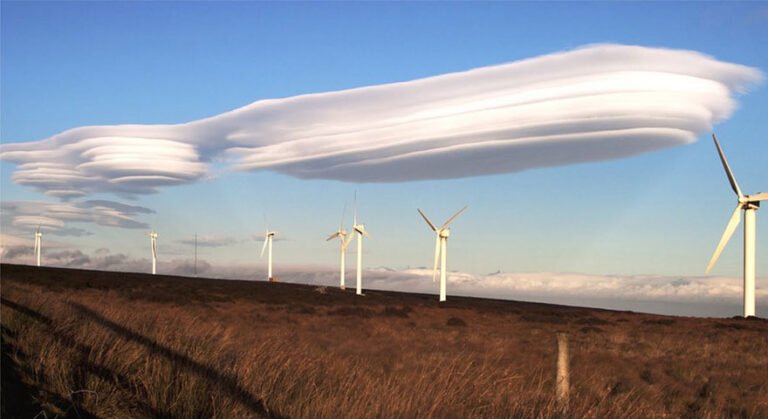
- Unusual clouds: lenticular clouds look like stacked discs, and mammatus clouds hang in rounded pouches.
- Fog: low fog hides the ground and makes buildings or trees appear to float.
- Dramatic sunsets: dust and moisture in the air can turn skies deep red or purple.
- Ice, snow, and waves: frost patterns, wind-carved snow, and curling waves create shapes that look sculpted.
- Volcanic landscapes: glowing lava, black sand, and steam produce colors that feel unreal.
These scenes look fake partly because most people never see them in person. Rarity, not editing, is what makes them feel impossible. Still, a dramatic sky alone does not prove a photo is genuine, since skies are also one of the most commonly replaced elements in editing.
Animals Caught at the Perfect Moment
Animals move fast and unpredictably, which makes wildlife and pet photography a reliable source of strange real photographs. A single frame can make an ordinary movement look bizarre.
Typical examples include:
- Birds in flight with wings in odd positions.
- Cats or dogs captured mid-jump, appearing to float.
- An animal partly hidden behind an object, so its body seems to belong to something else.
- Two or more animals lined up so they look like one creature.
- Birds that seem to perch on buildings or aircraft far behind them.
- Animals mirrored perfectly in still water.
Timing, shutter speed, and composition all matter here. Wildlife photographers often use shutter speeds of 1/2000 second or faster for birds in flight, along with continuous autofocus and burst shooting. Framing decides whether a hidden head or overlapping body creates a funny illusion or just a confusing image.
Architecture That Looks Impossible
Buildings are fixed, but the way a camera sees them is not. Architecture photography often produces impossible-looking photos through angle and geometry alone.
Features that create illusions include:
- Curved or twisted towers that seem to bend.
- Spiral staircases that look like endless tunnels when shot from the top or bottom.
- Bridges and walkways that appear to lead nowhere.
- Repeating windows and balconies that form hypnotic patterns.
- Perfect symmetry that looks digitally mirrored.
- Tall buildings that lean inward when shot looking straight up.
- Fog that cuts off the base of skyscrapers so they seem to hang in the sky.
- Glass facades that reflect neighboring structures.
Camera position makes the difference. Pointing the camera upward causes vertical lines to converge, a form of perspective distortion. Standing dead center under a dome or stairwell produces symmetry that feels unnatural. Moving a few steps to the side can turn the same building into an ordinary photo.
Photos That Look Like Photoshop But Are Real
Viewers often assume an unusual image has been edited because it breaks expectations. The most common triggers are:
- Perfect alignment between unrelated objects.
- An angle we never see from eye level.
- Shadows falling in unexpected directions.
- Reflections that blend two scenes.
- Confusing scale between near and far subjects.
- Rare moments that last only a fraction of a second.
- Intense colors from natural light.
- Unusual lighting, such as stage lights or neon.
Here is the important part: visual appearance alone is not enough to prove whether an image has been manipulated. A real photo can look edited, and a skillfully edited photo can look completely natural. Judging authenticity requires context, not just a gut reaction.
Real Photo vs Edited Photo vs Manipulated Photo
Not all editing is the same. These categories help separate normal processing from changes to what actually happened.
| Image Type | Meaning | Example |
|---|---|---|
| Original photo | Captured by camera with minimal processing | Natural scene |
| Edited photo | Basic improvements made | Exposure and color correction |
| Retouched photo | Specific visual details improved | Portrait cleanup |
| Composite image | Multiple images combined | Creative advertisement |
| Manipulated image | Image content significantly changed | Digitally altering the scene |
Editing does not automatically mean an image is fake. A RAW file (the unprocessed data from a camera sensor) usually looks flat and dull. It typically needs exposure, color, sharpening, and lens corrections before publication. Those adjustments bring the image closer to what the photographer saw, not further from it.
The line is crossed when content is added, removed, or moved in a way that changes the story the photo tells.
How to Tell If a Mind-Bending Photo Is Real
Use these checks together. No single visual clue can always prove whether a photograph is authentic.
1. Find the Original Source
Track down the photographer or the first publisher. Original creators often share behind-the-scenes shots, location details, or other frames from the same session.
2. Check Reverse Image Search
Tools like Google Lens or TinEye show where else an image appears online. They can reveal older copies, the original context, or source images used in a composite. They cannot tell you whether the pixels were edited.
3. Examine Reflections
A reflection should match its subject in shape, angle, and lighting. A reflection that shows the wrong side of an object or a missing element is worth questioning.
4. Examine Shadows
Shadows from one light source should point in a consistent direction. Several shadows going different ways in an outdoor daytime scene may suggest added elements, though multiple lights can explain it indoors or at night.
5. Check Object Edges
Look for halos, blurry outlines, mismatched sharpness, or hair that looks cut out. These are common signs of poor masking.
6. Check Perspective
Objects should share logical vanishing points and sit on the same ground plane. A person who appears to stand on nothing may have been pasted in.
7. Look for Repeated Patterns
Identical clouds, leaves, or people in different parts of the image can indicate cloning, a tool that copies pixels from one area to another.
8. Check Metadata When Available
Metadata (EXIF data) records details like camera model, date, and settings. It can be useful, but it is often stripped by social media and can also be edited. Treat it as a clue, not proof.
9. Compare Different Versions
Older or higher-resolution versions may show details that later copies lost, or reveal that an element was added over time.
10. Look for Reliable Context
Who published it, when, and with what explanation? A news agency with a named photographer offers more confidence than an anonymous repost. Some publishers also attach content credentials that record an image’s editing history.
Can a Smartphone Create Mind-Bending Photos?
Yes. Modern phones are capable tools for unusual photographs, and some of their features make strange images even more likely.
- Multiple lenses: many phones include ultra-wide, standard, and telephoto cameras, so you can explore both exaggerated depth and compression.
- Panorama: moving subjects can appear twice or get stretched as the phone stitches frames together.
- HDR: combining several exposures can produce very even light that looks almost painted.
- Portrait mode: software blurs the background, and its mistakes can cut off ears or glasses in odd ways.
- Night mode: long, multi-frame captures can brighten dark scenes beyond what the eye saw.
- Burst photography: handy for catching jumps and animals mid-motion.
- Computational photography: the phone merges and processes multiple frames automatically.
That last point matters. A smartphone photo is often a software blend of many frames. It is still a real photograph of a real scene, but processing can shape color, detail, and contrast before you ever touch an editing app.
How to Create Your Own Mind-Bending Photos
You don’t need expensive gear to make mind-bending photography. These eight techniques work with almost any camera, including a phone.
Technique 1: Forced Perspective
Place one subject close to the camera and another far away. Have the far subject move left, right, closer, or back until the two line up the way you want. Use a smaller aperture so both stay sharp.
Technique 2: Reflection Photography
Look for still water, glass, or mirrors. Get low to a puddle so it fills the bottom of the frame, or shoot through a window so the reflection overlaps the scene behind it.
Technique 3: Shadow Photography
Shoot in early morning or late afternoon when the sun is low and shadows are long. Frame the shadow as the main subject and leave the object that casts it out of the shot.
Technique 4: Perfect Timing
Use burst mode and a fast shutter speed. Pre-focus on the spot where action will happen and start shooting just before it does.
Technique 5: Low-Angle Photography
Put the camera near the ground. Small objects become towering, people look heroic, and the horizon drops so the sky dominates.
Technique 6: High-Angle Photography
Shoot from above, looking down. People become patterns on the ground, and lying subjects can appear to stand, climb, or fly against a flat surface.
Technique 7: Framing
Use doorways, arches, branches, or hands to frame distant subjects. A frame creates a visual link between objects that are actually far apart.
Technique 8: Lens Compression
Step far back and zoom in with a longer focal length. Distant objects, like the moon behind a building, will look larger relative to the foreground.
Camera Settings for Mind-Bending Photography
There is no single correct setting, because light and subjects change constantly. Understanding what each control does helps you adapt.
- Shutter speed: a fast shutter speed freezes motion, while a slower shutter speed creates motion blur. A long exposure of several seconds can smooth water into mist.
- Aperture: the lens opening, written as f-numbers. A low number like f/2 blurs the background. A higher number like f/11 keeps more in focus, which helps forced perspective.
- ISO: the sensor’s sensitivity to light. Raise it in dim conditions to keep shutter speeds fast, but expect more noise (grain).
- Focal length: wide for exaggerated depth, long for compression.
- Focus: single-point focus for static illusions, continuous focus for moving subjects.
- Exposure: protect highlights in bright skies and reflections, since blown-out areas can’t be recovered.
- White balance: controls color temperature. Keeping it accurate prevents a natural scene from looking artificially warm or cool.
How Photo Editing Can Improve a Real Mind-Bending Photograph
Post-production helps a real image look the way the scene actually looked. Legitimate adjustments include:
- Exposure correction and highlight recovery
- Shadow adjustment and contrast tuning
- Color correction and white balance
- Lens correction for distortion and vignetting
- Perspective correction for leaning buildings
- Cropping to strengthen composition
- Sharpening and noise reduction
- Selective masking, which adjusts one area without affecting the rest
The difference is purpose. Improving a photograph refines what the camera recorded. Changing what actually happened, such as adding a bird or moving the moon, turns it into a composite or a manipulated image. Both have their place, but honest labeling matters when a photo is presented as real.
When Professional Photo Retouching Makes Sense
Some projects need more time or consistency than a photographer can give them. Professional retouching is useful for:
- Creative and editorial photography
- Travel photography portfolios
- Commercial campaigns and advertising
- Social media content in large volumes
- Print projects that demand accurate color
- Brand content that must match across many images
Good retouching preserves natural detail and the photographer’s original vision. The goal is a cleaner, more polished version of the real image, not a different one.
Clipping Area: Post-Production Photo Retouching
“Clipping Area is a Post-Production Photo Retouching Agency.” The team supports photographers, brands, agencies, and businesses that need consistent, natural-looking edits.
Services include:
- Photo retouching and image enhancement
- Color correction
- Background removal and background cleanup
- Object removal
- Clipping path
- Creative photo editing
- Product photo editing
For surreal or unusual photographs, careful post-production can correct exposure, balance color, and clean up distractions while keeping the scene believable. If you’re a photographer or business planning a larger project, you can send a small sample batch first to review the editing approach before committing.
Common Mistakes When Editing Surreal-Looking Photos
A real illusion is already hard to believe. Heavy editing can push it over the edge, making viewers dismiss a genuine moment as fake. Watch for these mistakes:
- Over-saturation: colors that glow beyond anything in nature.
- Excessive HDR: halos around edges and flat, gray midtones.
- Over-sharpening: crunchy textures and bright outlines.
- Fake-looking shadows: shadows added or darkened without matching the light.
- Poor masking: visible cut lines around hair, fur, or edges.
- Excessive clarity: gritty skin and harsh clouds.
- Unrealistic colors and overdone contrast: crushed blacks and neon skies.
- Removing natural details: erasing texture, grain, or small imperfections that prove the scene is real.
- Artificial reflections: reflections cleaned so perfectly they look duplicated.
- Overusing AI effects: generated fills or sky swaps that introduce new content.
Subtle editing usually produces a stronger result. When the adjustments are invisible, viewers focus on the illusion itself, and the photo stays believable.
Why Do We Find These Photos So Fascinating?
Whenever we look at a picture, we try to make sense of it. We look for depth, scale, movement, light direction, familiar objects, and how things sit in space. Usually this happens without effort.
Mind-bending photos interrupt that process. The image offers clues that point to two different answers at once: the cup is closer, but the person looks like they’re standing in it. That small conflict makes us look again, and then look harder.
The moment we figure out how the photo works is rewarding. It also reminds us that seeing is an act of interpretation, not just recording. That is why bizarre real photos get shared so widely, and why a single clever angle can stop someone mid-scroll.
Frequently Asked Questions
What are mind-bending photos?
Mind-bending photos are images that appear impossible, edited, or computer-generated but show real scenes. They usually rely on perspective, timing, reflections, shadows, scale, or rare natural events.
Why do some real photos look fake?
A camera flattens a three-dimensional scene into two dimensions. That removes depth clues, so objects at different distances can appear connected, oversized, or floating.
How does forced perspective work in photography?
Forced perspective places subjects at different distances from the camera and aligns them in the frame. The near subject looks large and the far subject looks small, creating a false sense of scale.
Can a real photograph look like CGI?
Yes. Rare weather, intense natural colors, perfect symmetry, and unusual lighting can all make a genuine photograph look rendered.
How can reflections make photos look fake?
Reflections show two scenes at once. When a reflection blends with the scene behind a surface, or mirrors a landscape perfectly, the result can look duplicated or impossible.
How can I tell if a strange photograph is real?
Find the original source, run a reverse image search, check shadows, reflections, edges, and perspective, and look for reliable context. No single check is definitive, so combine several.
Is an edited photo automatically fake?
No. Exposure, color, sharpening, and lens corrections are normal parts of processing. A photo becomes manipulated when its content is significantly changed.
Do I need a professional camera to create mind-bending photography?
No. A smartphone with burst mode and multiple lenses can create forced perspective, reflection, shadow, and timing illusions. Positioning and patience matter more than gear.